- The Sound of a Win: Why Audio Feedback Matters So Much in Casual Games
Mute a casual game and watch what happens. The animations still play, the numbers still climb, the round still resolves exactly as designed. It just stops feeling like anything. The part that registered as a win was arriving through the speakers.
The contract a sound makes
Every sound in a well-built game is a promise about what just happened. A short rising figure means progress. A single clean tone means the input registered. A dense cluster of notes means something unusual, and players learn that scale within a handful of rounds.
The timing window is narrow. Feedback that lands almost instantly reads as caused by the player. Delay it by half a second and the same sound reads as the game reacting on its own schedule. Latency is an agency problem here.
Short-session games depend on this more than long ones, because there is no story arc carrying the player forward. On platforms built around quick rounds, including the casual titles collected on Splash Coins, audio does the work that pacing and narrative do elsewhere: marking the start, holding tension, and delivering an unmistakable ending.
What the research actually found
The evidence is messier than industry folklore suggests. Psychologist Siu-Lan Tan, writing for Oxford University Press, reviewed studies that compared the conditions and found them split. One reported shooter scores nearly doubling with sound on; another found faster racing laps with the music off.
Tan's own work with colleagues explains the split. In an action-adventure game rich in auditory cues, performance was worst with all audio disabled and improved as sound was added back, because those cues carried warnings and confirmations the screen never showed. The lesson is that sound helps when it carries what the eyes cannot.
Juiciness is measurable
Designers call exaggerated, layered feedback juiciness. Researchers at Eindhoven University of Technology built two versions of one game that differed only in juicy audio, and players in that version felt closer to the game, reporting greater presence. Asked to describe what they had heard, though, they struggled. There is no shared vocabulary for game sound.
Cut first, regretted later
Audio is usually the last thing added and the first thing trimmed, which is how a game tests well in a silent office and falls flat on a phone. Community threads will argue about top rated gaming snacks for pages before anyone asks why one game felt satisfying. Many players also run games muted, so sound should sharpen visuals, never replace them.
Listen to your own game with your eyes shut
Close your eyes, have someone else play a round, and describe it from audio alone. If you can tell when it started, when something good happened, roughly how good it was, and when it ended, the sound design is working.
Casual games have nothing else to hide behind. There is no cutscene and no score swelling on cue at a story beat, just a tap, a result, and half a second to prove it was worth the attention.
0m - Sep 29, 2026 - How Podcasts Became the Unlikely Home for Traffic Safety Storytelling

Traffic safety messaging used to arrive in short, loud bursts. Think of a 30-second radio spot before the morning news, a billboard on the interstate with a shocking number and a hotline, or the driver's ed video watched once at 15 and never played again.
The pitch was usually the same: scare people fast, then let them go. Today, a growing number of the same agencies, advocates, and researchers who once bought that airtime are producing hour-long podcast episodes instead, and drivers are choosing, on their own time, to press play.
Attention has shifted. If you want to reach a driver in the seat where they think about driving, you need to be inside the earbuds they wear on the commute, not on a poster they pass at 65 miles an hour.
The Commute Became the Classroom
One question runs through this piece: why did serious safety advocates, people who spend their careers trying to keep drivers alive, decide a podcast feed was worth the effort? Start with where the audience went. Pew Research tracks a steady climb in adult podcast listening, with the strongest concentration among the same younger drivers who show up disproportionately in crash data.
The car is one of the top places listening happens. That is a rare alignment for a public-health message: the medium and the moment overlap.
Old-format safety messaging had to fight for attention, while a podcast episode arrives with the listener already leaning in. The listener opted in, put in the earbuds, and gave the show 40 minutes. An advocate who can hold that time gets something no billboard has ever offered: room to explain.
Agencies Started Making Shows, Not Ads
The clearest evidence the format took hold is that safety organizations stopped hiring podcasts and started producing them. The Governors Highway Safety Association runs The Intersection, a show that brings state safety officials and former federal regulators into long conversations about what is and isn't working on the road.
State agencies followed. Florida's motor vehicle department produces a driver-education podcast aimed squarely at teens and their parents. The National Center for Rural Road Safety produces Home Safely, focused on the roads where fatality rates are highest per mile driven.
None of these shows top the entertainment charts, and they don't need to. A few thousand engaged listeners, traffic engineers, city council members, driving instructors, parents of new drivers, is a more useful audience for a safety agency than a million passive impressions.
Story Beats Statistic, and the Science Backs It Up
Advocates learned something the hard way over the last two decades: the raw annual fatality number, on its own, does not move behavior. People hear a big round total and file it under background noise. But narrative immersion, following a specific person through a specific event, can change what listeners believe they can do differently.
Statistics inform. Stories rehearse a decision. That is what a podcast episode can deliver that a PSA cannot. Forty minutes with a trauma nurse describing what she sees during an overnight shift. An hour with a driver who caused a fatal crash at 22 and now speaks to high schools. A conversation with the engineer who redesigned an intersection after three pedestrians died at it.
What Advocates Learned About Reaching Drivers
A few practical lessons keep showing up across the safety shows that have found an audience:
● Name a person, not a population. Episodes that follow one family, one officer, or one survivor outperform episodes framed around annual totals.
● Talk to drivers as adults. Hosts who explain trade-offs, why a road was designed the way it was, why enforcement changed, earn more trust than hosts who lecture.
● Bring the expert into the room. A civil engineer, an ER doctor, a crash reconstructionist, or a personal injury attorney can walk a listener through what happens after a collision in a way no 30-second spot can.
● Publish the transcript. A searchable transcript turns one episode into a reference the field can cite for years.
● Keep releasing. Safety behavior changes with repetition, not revelation.
The Format Still Has Blind Spots
Podcasts skew younger, wealthier, and more urban than the general driving population, and that shapes who hears the safety message. The drivers at highest risk on rural two-lane roads, and the pedestrians most overrepresented in fatal crashes, are not always the ones downloading a policy show. Advocacy groups have started to notice, and some shows now build episodes around exactly that mismatch, inviting community organizers, tribal transportation directors, and public-health workers who see the disparities up close.
Firms that work with crash victims see the same pattern in their casework, which is why some now publish pedestrian risk data alongside their client work. That kind of specific, local reporting is the raw material a good safety podcast turns into a story a driver will remember at the next crosswalk.
0m - Sep 29, 2026 - The Podcast Ad That Pulled Your Credit File: How Programmatic Audio Targeting Is Triggering Consumer Reporting Rules

A listener opens a true-crime show on their morning walk. Before the host even says hello, a 15-second spot for a debt-consolidation product plays. The ad is not random. Somewhere in the milliseconds before the file streamed, a demand-side platform matched an audience segment to that listener's device, and the segment was built on the kind of information the Fair Credit Reporting Act was written to govern.
Programmatic audio has been sold to advertisers as the cure for podcasting's old measurement problem. It is also, quietly, moving sensitive consumer signals through pipes that were largely designed without consumer-reporting law in mind. That is a compliance story the industry has not really absorbed yet.
The Ad Buy Is Not the Simple Sponsorship It Used to Be
The old podcast ad was a host reading a script. One show, one audience, one price.
The new podcast ad is dynamically inserted at request time, priced in a real-time auction, and routed to a specific listener based on data signals passed between a publisher, an ad server, a supply-side platform, and a demand-side platform. The listener hears a single spot. The infrastructure behind it touched half a dozen companies.
Some of those signals are innocuous: device type, app, city-level location, episode genre. Others are not. Audience segments sold in audio marketplaces routinely include categories like "in-market for auto refinance," "active credit shopper," "subprime auto," "recent bankruptcy," "medical debt in collections," and "active mortgage lead." Those describe a person's financial condition, and that is exactly the territory the FCRA polices.
Where a Marketing Segment Becomes a Consumer Report
The FCRA does not care what a company calls itself. It cares what the company actually does. If a business assembles or evaluates information about consumers and furnishes it to third parties for decisions about credit, insurance, employment, or housing, it can be a consumer reporting agency, whether or not it prints "credit bureau" on the door. The FTC has been blunt about this for years, warning in a widely cited business alert that saying you are not a CRA does not make it so.
That framing is what makes programmatic audio interesting. A data broker that packages a "likely to qualify for a personal loan" segment and sells it into an audio DSP is arguably doing two regulated things at once: assembling consumer information, and transmitting it so a lender can decide whom to solicit. If a lender uses the segment to decide who hears its offer, that starts to look like a permissible-purpose question, not a marketing question.
The CFPB Has Already Signaled Where This Is Going
Regulators have been circling the data-broker ecosystem for a while, and the direction of travel is not subtle. A proposed rule published in the Federal Register would clarify that companies selling certain categories of sensitive consumer information, including credit-header data and financial-status indicators, are consumer reporting agencies under Regulation V and that the information they sell is a consumer report. The rule's fate is its own political story, but the underlying legal theory is not new.
For audio ad tech, that has an uncomfortable implication. A vendor whose data-onboarding pipeline drops "in collections" or "credit score band" attributes into a bid request is not obviously outside the definition. The signal is small and fast, but the FCRA does not measure obligations in packet size.
What Is Actually at Stake for Listeners and Advertisers
Listeners face the concrete harms familiar to anyone who works in credit-reporting law: opaque decisions about who sees which credit offer, financial attributes attached to a device without consent, and no dispute path when the underlying data is wrong. For advertisers and platforms, the exposure is statutory damages, class actions, and regulatory enforcement, all built on a definition of "consumer report" that is broader than the marketing side of the house tends to assume. Consumers who suspect their financial data has been misused in this way can consult a consumer credit reporting attorney to understand what rights the statute actually gives them and what a claim would need to prove.
The Quiet Part the Industry Will Have to Say Out Loud
Podcasting spent a decade building trust as an intimate medium. The programmatic layer bolted on top of it borrowed its plumbing from display advertising, and it inherited display's habits around data. Some of those habits do not survive contact with consumer-reporting law once the segments get specific enough.
The fix is not to abandon targeting. It is to treat certain audience categories as regulated data, to demand contractual representations from upstream providers about how segments were built, and to keep the truly sensitive attributes out of the bid stream entirely. The ad that pulled a credit file is not a metaphor for much longer. The rules that govern that pull have been on the books since 1970, and they are catching up with the microphone.
0m - Sep 29, 2026 - Why Zero-Party Signals Are Reshaping Podcast Ad Buying

For years, a podcast media plan started with the same question: how many people will hear the ad? Downloads, unique listeners, and estimated reach carried the buy. That's still the entry point on most rate cards, but it is no longer where the interesting money is going in 2026.
The shift is quiet but real. Advertisers are paying more attention to what a listener has actively told someone, and less to how many pairs of ears the download number implies. The signal that matters now is the hand raised on purpose: a preference stated, a code entered, a survey answered, a follow-up requested. That's zero-party data, and it is starting to rearrange how podcast campaigns get planned, priced, and measured.
Reach Is Still the Rate Card, but Not the Whole Story
Podcast reach measurement is a genuine technical achievement. The industry spent years agreeing on how to count a download honestly, and the current standards define what actually counts as a delivered impression across a fragmented listening ecosystem. That work made podcast advertising buyable at scale, and it isn't going anywhere.
What's changing is what buyers do once they've cleared that bar. A campaign that hits a million verified downloads is a starting point, not a result. The pressure now is to show which of those listeners moved, when, and why, and reach numbers alone were rarely built to answer that.
Advertisers who used to accept a post-campaign delivery report are asking the harder question underneath it: which listeners chose to identify themselves, and what did they say when they did? That question connects podcast buying to the broader lead generation shifts reshaping how buyers qualify demand across every channel.
What Counts as a Raised Hand
Zero-party data is the information a person volunteers on purpose. It isn't inferred from a device graph or scraped from a browser trail. Salesforce's working definition covers preferences, purchase intentions, and the context a customer actively shares with a brand, and it's a useful frame for what podcast advertisers are now trying to collect at the point of ad exposure.
In a podcast context, the raised hand takes several concrete forms. None of them are new individually. What's new is treating them as the primary KPI instead of a nice-to-have on the side of a reach report.
Why the Shift Is Happening Now
Three pressures are pushing buyers in the same direction. The first is privacy. Passive tracking on the open web keeps getting harder, and consent-based data is one of the few inputs that doesn't degrade every time a browser or regulator tightens the rules. Podcasts, historically light on cookies, look attractive precisely because their strongest signals tend to be consented ones.
The second pressure is attribution. Dynamic ad insertion made podcast inventory buyable like the rest of digital, but it also made buyers ask digital-style questions about outcomes. A raised hand is easier to tie back to a specific ad than a modeled lift number, and it survives the scrutiny of a finance team that wants to see the pipeline it produced.
The third is trust. Host-read ads convert because listeners feel spoken to rather than targeted at, and that same dynamic is what makes them willing to share information when asked directly. A well-framed ask from a host the audience already trusts often outperforms a slicker prompt from a brand the audience doesn't know.
What This Changes for Media Planning
The practical work of buying a podcast campaign starts to look different when the KPI is a volunteered signal rather than a delivered impression. Shows get evaluated on how well their audiences respond to prompts, not only on how large those audiences are. A mid-sized show with a habit of engaged replies is often worth more than a bigger one with a passive listen-through.
Creative gets rewritten to earn the hand-raise, not to squeeze a benefit statement into thirty seconds. Measurement extends past the click into what the listener actually said next. That doesn't displace reach as a planning input. It reframes it: reach becomes the denominator, and the raised hand becomes the numerator that matters.
Where Advertisers Should Start
Brands still buying podcasts on delivered impressions alone don't need to tear up the plan to move toward zero-party signals. The shift takes bolting a capture layer onto the campaigns already running, and then letting the data slowly change how the next flight is bought. Start with one show where the host is willing to voice a specific, memorable prompt, and one landing page built to receive whatever the listener chose to share. From there, the pattern extends: more shows, sharper prompts, and a growing file of listeners who identified themselves rather than being inferred.
The Metric That Rewards the Medium
Podcasts have tended to be better at intimacy than at scale, and much of the industry spent a decade chasing reach numbers that made them look like radio. Zero-party signals reward what the medium is actually good at: a listener who was paying enough attention to act, and willing enough to say so. That is a smaller number than downloads, and a more honest one. In 2026, it's the number more advertisers are choosing to plan around.
0m - Sep 29, 2026 - Free Floor Plan Generator: From Idea to a 2D or 3D Plan

A free floor plan generator turns room dimensions and layout ideas into a clear 2D or 3D plan online in minutes, no design software or account required.
Most people who want to redesign a kitchen, compare an apartment layout, or pitch an office redesign don't need architectural software. They need a fast way to see the idea. A free floor plan generator does exactly that: describe the rooms, set the dimensions, and get a usable layout without installing anything or paying for a license. Two tools built around this idea, free floor plan generator and floor plan Al 3D, cover the two halves of the job: building a plan from scratch, and turning an existing 2D layout into a floor plan AI 3D view. Here's how each one works and when to use which.
What a Free Floor Plan Generator Actually Does
A floor plan generator is a browser-based tool that converts room requirements — bedrooms, bathrooms, total area, an open or closed kitchen — into a structured layout. Instead of dragging walls pixel by pixel, you fill in a short form and the tool builds a plan that respects those constraints. Floor Plan Generator works this way: pick a space type (house, office, or custom), describe the layout in plain language or set bedroom and bathroom counts, choose a 2D or 3D style, and generate. No account is required, and the output can be exported as a PNG for sharing or a DXF file for a CAD workflow.
This matters most in the early stage of a project, before anyone has committed to a direction. Comparing three or four layout options this way is faster and cheaper than sketching each one by hand, and it gives a client or a partner something concrete to react to rather than a verbal description.
How to Create a Floor Plan Online in Three Steps
Choose the Space
Start with a house, apartment, office, or custom layout. A template fills in a prepared brief — dimensions, room count, style — that you can edit before generating anything, which is useful if you're not sure where to start.
Set the Requirements
Add the details that actually shape the layout: total area, bedroom and bathroom counts, an open or closed kitchen, and any extra spaces like laundry or storage. The more specific the input, the less editing the output needs afterward.
Generate and Export
Pick 2D for a clear technical layout or 3D for a sense of volume and space, then generate the plan and export it as PNG or DXF. Switching between 2D and 3D for the same brief is a separate generation, not a toggle on one result.

Floor Plan AI 3D: Turning a Flat Layout Into a 3D View
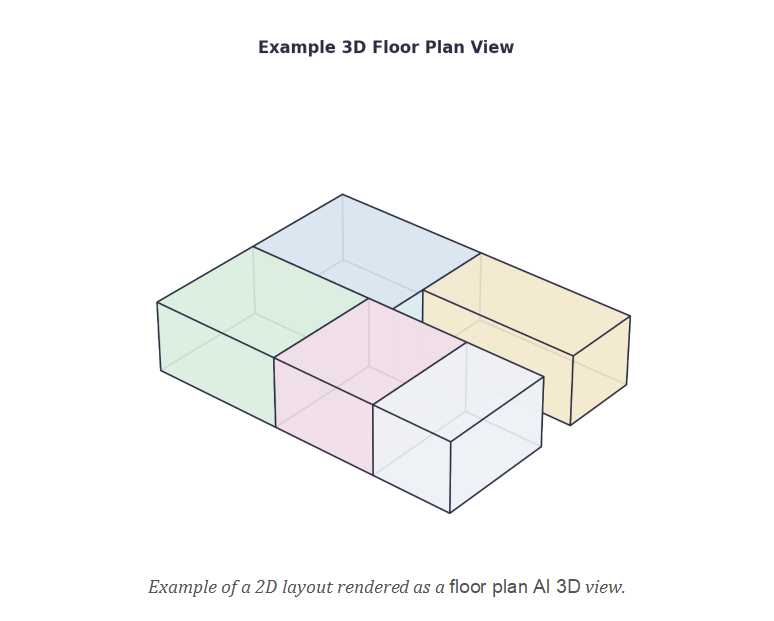
Not every project starts from zero. Plenty of people already have a 2D floor plan — from an agent, a contractor, or an earlier design pass — and just want to see it in three dimensions. That's the specific problem floor plan Al 3D solves. Upload an existing plan as a JPG, PNG, WEBP, HEIC, or PDF, choose a presenting style, viewing angle (top, isometric, aerial, or eye-level), and a background, then generate a furnished or unfurnished 3D render. The original 2D layout stays the structural reference, so the 3D result follows the actual room shapes instead of inventing a new one.
This kind of floor plan AI 3D conversion is genuinely more useful than a flat drawing when the audience isn't trained to read blueprints. Buyers, tenants, and first-time renovators tend to misjudge scale from a 2D plan; a 3D view removes that guesswork by showing how the rooms actually connect.
Choosing Between 2D and 3D for Your Project
2D is the better choice when precision matters more than presentation: confirming room dimensions, checking circulation between spaces, or preparing a reference for a contractor. 3D wins when the goal is communication rather than measurement — showing a client, buyer, or family member what a space will actually feel like.
Neither tool replaces a licensed architect or engineer for construction-ready drawings. Both are explicit about that: outputs are concept visuals meant for early planning and communication, not permit submissions. Treat the result as a starting point for a conversation, and confirm structural details with a qualified professional before anything gets built.
Who Actually Uses These Tools?
Homeowners use a free floor plan generator to test a kitchen or bedroom rearrangement before committing to a renovation budget. Interior designers and real estate agents lean on the 3D conversion to help clients and buyers understand a layout faster than a flat plan allows. Small offices and coworking operators use both tools to compare private, open-plan, and hybrid layouts before signing a lease or a build-out contract.
Conclusion
A free floor plan generator won't replace a professional drafting service, but it removes the biggest barrier to early planning: not knowing what a layout will actually look like. Start with free floor plan generator to build a plan from a brief, and use floor plan Al 3D when you already have a 2D layout and want a floor plan AI 3D view to share. Together, they cover most of what a homeowner, designer, or small business needs before hiring a professional for the final drawings.
0m - Sep 29, 2026 - What Is a CR80 ID Card? Size, Thickness and Printing Explained
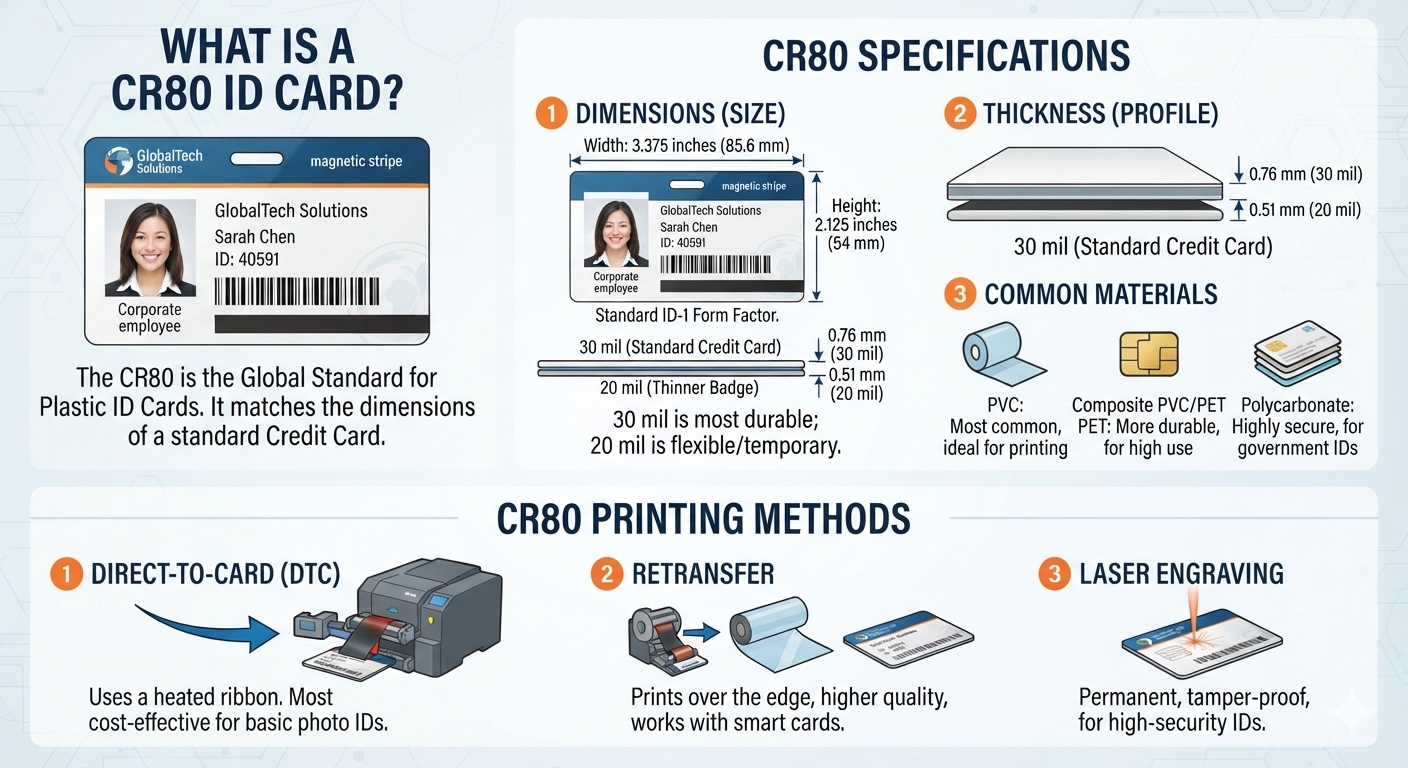
If you have ever ordered employee badges, access cards, membership cards or hotel key cards, you have probably encountered the term CR80. It may sound like a technical specification, but it simply refers to the standard size used for most plastic identification cards.
In fact, there is a good chance you already have several CR80 cards in your wallet. Credit cards, debit cards and many identification cards use essentially the same dimensions.
Understanding CR80 size, card thickness and printing requirements can help businesses avoid ordering the wrong cards, badge holders or printing supplies. Here is what you need to know.
What Is a CR80 ID Card?
A CR80 card is the standard plastic card format commonly used for employee identification badges, access credentials, membership cards and many other types of plastic cards.
The standard CR80 dimensions are approximately:
3.375 inches × 2.125 inches
or
85.60 mm × 53.98 mm
This format corresponds to the ISO/IEC 7810 ID-1 identification-card standard.
One reason CR80 became so widely used is compatibility. The dimensions are familiar to manufacturers of wallets, badge holders, card printers, access-control readers and other equipment.
For organizations ordering professional id cards, CR80 is generally the default format unless there is a specific reason to use a different card size.
Is CR80 the Same Size as a Credit Card?
Yes. For practical purposes, a CR80 ID card has the same dimensions as the standard cards found in most wallets.
That makes CR80 particularly convenient for employee identification. Employees can carry the card in a wallet, attach it to a badge reel or place it inside a standard clear ID holder.
The standardized dimensions also make purchasing accessories easier. Instead of requiring a custom holder for a company badge, businesses can choose from thousands of products designed around the CR80 format.
How Thick Is a CR80 Card?
Card size and card thickness are two separate specifications.
While CR80 describes the width and height of the card, thickness is usually measured in mil. One mil equals one-thousandth of an inch.
A typical CR80 PVC card is:
30 mil thick
That equals approximately:
0.030 inches or 0.76 mm
Thirty-mil cards have the solid, slightly flexible feel most people associate with a credit card.
However, not every CR80 card has to be 30 mil thick. Depending on the application, plastic cards may be manufactured in different thicknesses.
For example, thinner cards may be suitable for temporary credentials, while organizations looking for a more substantial badge may consider 40 mil ID cards.
Before choosing a nonstandard thickness, it is important to verify compatibility with printers, card readers and badge holders.
What Material Are CR80 Cards Made From?
PVC is one of the most common materials used for employee ID cards. It provides a smooth printing surface, reasonable durability and the flexibility expected from a standard identification card.
Composite materials may also be used, particularly when additional durability or resistance to heat is needed.
The card can also contain additional technology without changing its familiar CR80 shape. Depending on the application, a CR80 badge might include a magnetic stripe, RFID technology, NFC functionality or other embedded components.
In other words, CR80 primarily describes the physical card format. It does not determine what information or technology the card can contain.
How Are CR80 ID Cards Printed?
There are several ways to produce CR80 employee ID cards.
Organizations with an ID card printer can print cards internally. Many desktop card printers use dye-sublimation technology to transfer photographs, logos, text and other graphics onto plastic cards.
Businesses can also use professional online ID card printing services instead of purchasing and maintaining their own printer. This can be especially practical when cards are ordered periodically rather than printed continuously throughout the day.
Regardless of the printing method, artwork should be created with the final CR80 dimensions in mind.
A card can be designed horizontally at approximately 3.375 × 2.125 inches or vertically at 2.125 × 3.375 inches. Portrait and landscape cards are physically the same size—the orientation simply changes.
What Resolution Should CR80 Artwork Use?
Resolution matters when creating photographs, logos and background graphics for an ID card.
At 300 DPI, the physical dimensions of a CR80 card translate to roughly 1,012 × 638 pixels, depending on the exact dimensions and rounding used by the design or printing system.
Printing providers may request slightly larger artwork when bleed is required. Bleed extends the background beyond the final cut or printable boundary so that small production variations do not leave an unwanted white edge.
Important information should also stay away from the outer edge. Names, employee numbers, photographs, QR codes and other essential elements should be positioned within a safe area.
CR80 vs. Other ID Card Sizes
Although CR80 is the standard, other card formats exist.
CR79 cards are slightly smaller and are sometimes used with adhesive-backed applications or certain proximity-card systems.
CR100 cards are considerably larger than CR80 and can be useful when identification needs to be visible from farther away, such as at conferences, events or secure facilities.
For most everyday employee identification applications, however, CR80 remains the most practical choice.
Why CR80 Is the Standard for Employee ID Cards
Standardization makes ID programs easier to manage.
Using CR80 cards means organizations can easily find compatible badge holders, lanyards, reels, printers and other accessories. Employees are also familiar with the size because it feels exactly like the cards they already carry every day.
A standard 30 mil CR80 PVC card is therefore a good starting point for most employee identification programs. From there, businesses can customize the card with photographs, job titles, company branding, QR codes, barcodes, magnetic stripes or contactless technology.
The important thing to remember is simple: CR80 describes the standard credit-card-sized format, while specifications such as 30 mil or 40 mil describe thickness.
Once those two measurements are understood, choosing the right employee ID card becomes much easier.
0m - Sep 28, 2026 - Short-Term or Annual IPTV Plans: Exploring Your Options with Tivio
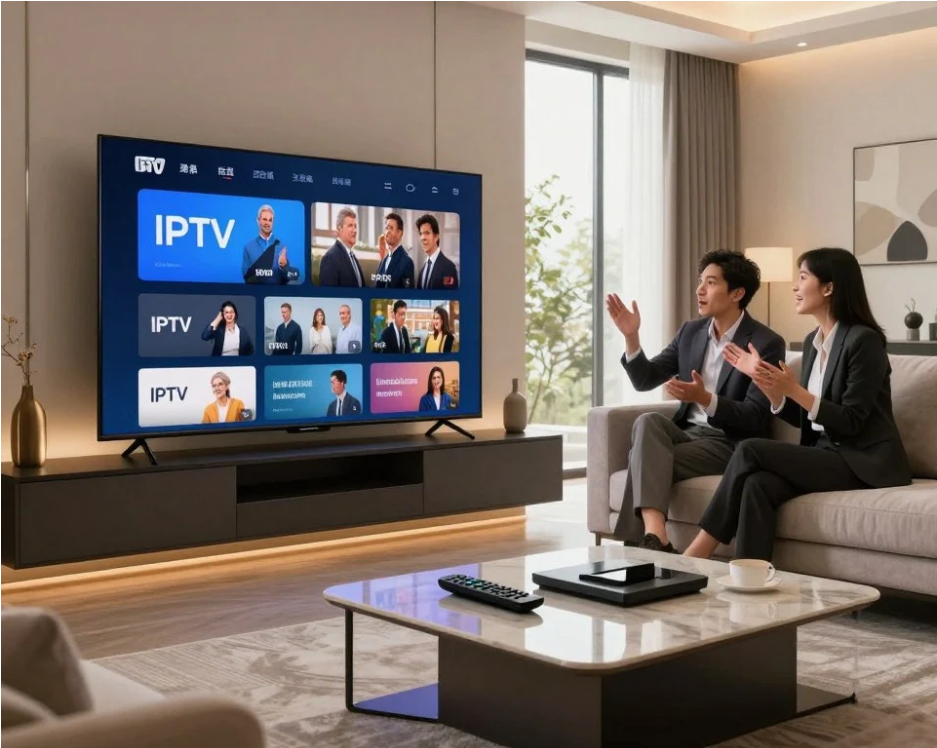
Tivio IPTV gives UK viewers a choice between shorter commitments and longer-term savings, with 3-month, 6-month, 12-month and 24-month options currently available. Choosing the right IPTV Subscription comes down to how confident you are in your setup, how regularly you watch, and whether flexibility matters more to you than the lower monthly-equivalent cost that usually comes with a longer plan. For a first-time user, a shorter term can make sense; for a household already happy with its devices, broadband and viewing routine, an annual plan may offer better long-term value.
There is no universally “best” subscription length.
Someone trying IPTV for the first time has a very different decision to make from a family that already knows which television, player and broadband connection it will use every evening.
That is why picking a plan should feel less like hunting for the biggest discount and more like deciding how much commitment actually suits your home.
A Short Plan Buys You Something Longer Plans Cannot: Flexibility
Longer plans naturally attract attention because the monthly-equivalent price usually drops.
But a shorter subscription gives you something valuable too.
Room to change your mind.
If you are completely new to IPTV, you may still have questions that no sales page can answer properly.
Does the service feel comfortable on your television?
Does your preferred player behave well?
Is the Wi-Fi strong enough in the room where you actually watch?
Do you use the programme guide as much as you expected?
Does the household need one connection or several?
A three-month plan gives you enough time to answer those questions through normal use rather than making a long commitment based on expectations.
That flexibility has real value.
Tivio Currently Starts With a Three-Month Option
Tivio's shortest current subscription period is three months.
The Standard three-month plan is listed at £24.99, while Premium currently costs £32.99 for the same period.
That makes the three-month option the natural starting point for someone who wants more than a brief trial but is not ready to commit for a year or two.
It gives you time to live with the service.
Not just test it for an afternoon.
You can see what happens on a busy Saturday night.
You can try it when several people are using the internet.
You can use it on the devices that actually matter to you.
That paints a much more useful picture than judging everything during the first few hours.
Six Months Sits in the Middle
Not everyone wants the shortest or longest option.
Six months can be the comfortable middle ground.
Tivio currently prices six months of Standard at £34.99 and Premium at £47.99. The site lists the Standard plan at an effective £5.83 per month and Premium at roughly £8 per month across the term.
For someone already fairly confident about IPTV but not ready for a full year, this can make sense.
Perhaps you have used similar services before.
You know your Fire TV Stick or Smart TV works well.
Your broadband is stable.
You understand how the player works.
You simply do not want to lock yourself into a longer period yet.
Six months gives you more breathing room than the starter plan without jumping immediately into annual territory.
Annual Plans Start to Make Sense Once the Setup Is Proven
The 12-month plan is where the value calculation changes.
Tivio currently lists Standard at £49.99 for one year, which works out at about £4.17 per month across the subscription period.
Premium is currently £62.99 for 12 months, or roughly £5.25 per month.
Compared with the shorter plans, the monthly-equivalent cost is noticeably lower.
That is attractive.
But annual value only matters if you are comfortable using the service for a full year.
This is why an annual IPTV Subscription usually makes more sense after you have confirmed the basics:
your device works well,
your player suits you,
your broadband handles the streams,
the household uses the service regularly,
and the connection allowance matches how many people actually watch.
Current UK IPTV buying guides make a similar point, commonly advising people to confirm devices and network performance before choosing a longer commitment.
Lower Monthly Cost Does Not Always Mean Better Value
This is where subscription comparisons can become misleading.
A longer plan can have the lowest monthly-equivalent cost and still be the wrong purchase.
Imagine paying for a year because the price looked excellent.
Two weeks later, you realise the player you prefer does not work particularly well on your main television.
Or you discover the bedroom Wi-Fi struggles.
Or your household really needed two simultaneous connections instead of one.
Suddenly, the cheaper monthly rate does not feel so clever.
Good value is not the smallest number after the pound sign.
It is paying for something you are comfortable using throughout the period you bought.
The 24-Month Plan Is for People Who Already Know What They Want
Tivio also offers a two-year option.
The current 24-month Standard price is £79.99, listed at an effective £3.33 per month.
Premium currently costs £117.99 for 24 months, or roughly £4.92 per month across the term.
Those are Tivio's lowest monthly-equivalent figures.
They also represent the longest commitment.
That distinction matters.
Two years can make sense for someone who already knows the service fits their viewing habits and plans to keep using it.
For someone who is still experimenting with devices, players or connection numbers, jumping directly to the longest plan may be unnecessary.
The biggest discount is most useful when confidence is already high.
Your Television Should Influence the Subscription Decision
Plan length is not the only choice being made.
You are also deciding which level of service makes sense.
Tivio Standard currently includes Full HD viewing on supported content, an EPG, sports and PPV coverage, installation guidance, device compatibility and UK-based support.
Premium adds supported 4K Ultra HD, a larger content catalogue, additional premium sports coverage, priority streaming, up to four days of catch-up on supported programmes, premium player activation and priority 24/7 support.
If your main television is Full HD and you rarely use catch-up, Standard may be perfectly suitable.
If you own a large 4K screen and regularly follow sport, Premium might fit better.
Choose the package first.
Then choose how long you want it.
That order usually leads to a better decision.
Do Not Commit Annually Before Checking Device Compatibility
This sounds obvious.
It still catches people out.
“Works on Smart TVs” does not mean every Smart TV runs the same apps.
Tivio currently lists support for compatible Smart TVs, Fire TV Stick devices, Android phones, iPhones, iPads, laptops, Roku and MAG boxes through suitable players.
Different devices can provide noticeably different experiences.
A recent Fire TV Stick may feel quick and responsive.
An older television's built-in operating system may feel slower.
A player available on Android may not be offered on another platform.
Current UK device guidance similarly recommends checking the exact app, operating-system version and device compatibility rather than assuming broad platform support guarantees the same experience everywhere.
This is precisely where a shorter subscription can be useful.
Test the service where you will actually watch it.
Your Broadband Deserves a Test Period Too
A speed test can tell you plenty.
It cannot completely predict how IPTV will behave in your home every evening.
Wi-Fi changes from room to room.
Network congestion changes during the day.
Other people start downloading files, gaming or making video calls.
Tivio suggests a stable 10 Mbps of available bandwidth per HD stream and around 25 Mbps or more per 4K stream as practical starting points. It also recommends allowing additional capacity when other devices share the connection.
That becomes more important when several people use IPTV at once.
A short plan gives you time to see whether the home network performs reliably under real conditions.
Not ideal conditions.
Real ones.
That difference matters.
Multiple Screens Can Change Which Subscription Feels Right
Suppose you buy an annual plan for one connection.
Then the household discovers that two televisions regularly need IPTV at the same time.
The subscription length was not necessarily wrong.
The connection choice was.
Tivio currently allows customers to select options up to four connections at checkout. Simultaneous viewing depends on the connection allowance purchased.
This is worth working out before making a long commitment.
Count active screens, not devices owned.
A family might have six compatible devices but only ever use two at once.
Another household may have just three TVs and regularly use all three.
Subscription planning becomes much easier when you think about actual evening behaviour.
Short-Term Plans Can Suit Seasonal Viewing
Not everyone watches television in the same way all year.
Sport is a good example.
Someone may use IPTV heavily during a particular part of the sporting calendar and much less afterwards.
Another viewer might want extra entertainment during winter when evenings are spent indoors.
A household may even be living somewhere temporarily.
In situations like these, an annual plan may not be necessary just because it offers a lower monthly figure.
A defined three or six-month IPTV Subscription can better match a defined period of heavier viewing.
That is a legitimate form of value.
Pay for the time you expect to use.
Annual Plans Suit Stable Viewing Habits
Now consider the opposite situation.
Your household watches television every evening.
The main device is settled.
The broadband is reliable.
You already know which channels, films and features matter.
Nobody expects that routine to change much over the next year.
This is where annual pricing becomes attractive.
You are no longer paying for flexibility you are unlikely to use.
Instead, the lower monthly-equivalent cost starts to matter more.
Current 2026 UK IPTV comparison pages generally frame annual subscriptions in this way: better suited once compatibility, catalogue and household requirements have already been established.
That is a sensible way to think about Tivio too.
One-Time Payment Changes the Commitment
Tivio's plans are currently sold as one-time payments for the chosen period.
They do not automatically renew.
This is important when comparing short and long terms.
If you buy three months, another three-month payment is not automatically taken when the period ends.
If you buy a year, the subscription does not silently roll into another year.
You make the renewal decision again.
For viewers who dislike keeping track of recurring entertainment payments, that can make longer plans feel easier to manage.
The commitment has a fixed end date.
Manual Renewal Gives You a Natural Review Point
Automatic subscriptions are convenient because you can forget about them.
That is also their weakness.
Manual renewal makes you stop and reassess.
Did you really use Premium?
Did you need three connections?
Would Standard now be enough?
Has someone in the household moved out?
Did you buy a 4K television?
Is catch-up now something you use every week?
Each subscription end becomes a chance to adjust.
That is particularly useful with a service whose plans and household needs can change over time.
Annual Does Not Mean Paying Monthly
This is another detail worth making clear.
When a plan is described as costing the equivalent of £4.17 per month, that does not mean Tivio charges £4.17 every month.
The current 12-month Standard price is £49.99 paid upfront for the full subscription period.
Likewise, the £5.25 monthly-equivalent Premium figure represents a £62.99 upfront annual payment.
Monthly equivalents are useful for comparing value.
Total price tells you what actually leaves your account.
Always look at both.
The Refund Window Matters More With Longer Plans
The longer the commitment, the more important it becomes to understand refund terms.
Tivio currently advertises a 14-day money-back guarantee. Customers are told to contact support within 14 days of purchase with their order details when requesting a refund, subject to the full refund policy.
Read those terms before buying.
Especially before buying 12 or 24 months.
A large “money-back guarantee” badge is reassuring, but the conditions underneath it are what actually matter.
Premium Features May Justify a Longer Plan for Some Viewers
Imagine someone who follows live sport every weekend.
They own a 4K television.
They regularly rely on catch-up.
They want premium player activation and value quicker support.
For them, Tivio Premium contains features that may be used constantly rather than occasionally.
Once that viewing pattern is established, a longer Premium subscription can make more sense than repeatedly choosing shorter periods.
Now imagine someone who mostly watches Full HD entertainment a few nights a week.
That person may be perfectly happy with Standard.
The point is not to buy the longest plan available.
It is to buy longer only when you already know which package fits.
A Short Plan Is Not “Wasting Money”
People sometimes look at the higher monthly-equivalent cost and assume shorter subscriptions are poor value.
That is too simplistic.
Flexibility itself has value.
A shorter plan limits your commitment while you learn.
It lets you test the service during normal household use.
It gives you an easier exit if your circumstances change.
A small premium for flexibility can be sensible when there is still uncertainty.
Think of it like booking a flexible ticket.
You are not necessarily paying more for the same thing.
You are paying for fewer restrictions.
An Annual Plan Is Not Automatically a Risk Either
The opposite assumption can be just as misleading.
An annual subscription is not inherently a bad decision simply because it lasts longer.
When you already know a service well, the longer term can be straightforward.
You pay once.
Your effective monthly cost is lower.
You do not have to think about renewing every few months.
And because Tivio does not currently auto-renew, the subscription still ends unless you actively buy another one.
For an established setup, that can be wonderfully uncomplicated.
Try Thinking in Terms of Confidence
There is a simple way to make the decision.
How confident are you?
Not in IPTV generally.
In your specific setup.
If you are still asking whether the player works well on your television, confidence is low.
A shorter term makes sense.
If you already know the device, broadband, plan and connection count all suit your household, confidence is much higher.
That is when annual pricing becomes more attractive.
Subscription duration should increase with certainty.
That is a far better rule than simply buying whichever card has the largest “SAVE” label.
What About Two Years?
Twenty-four months sits beyond the normal annual comparison.
It makes most sense when very little uncertainty remains.
Tivio currently describes its 24-month plans as the maximum-savings options, with Standard listed at £79.99 and Premium at £117.99.
For an established viewer, that may offer attractive long-term value.
For a first-time customer, two years is a substantial period to commit before experiencing the service properly.
There is no prize for choosing the longest plan on day one.
The smartest purchase is the one you remain comfortable with afterwards.
Short-Term or Annual IPTV Plans: Which Fits You?
Choose a shorter Tivio term when you are still learning what works.
It makes sense when IPTV is new to your household, when you are testing a device or player, when your viewing is seasonal or when you simply value flexibility.
An annual plan becomes more appealing once your setup is settled.
If the service works reliably, your broadband handles it comfortably, the household uses it throughout the year and you know which plan features matter, the lower monthly-equivalent cost becomes much more meaningful.
That is the real choice behind an IPTV Subscription.
Short-term plans buy flexibility.
Annual plans reward confidence.
Tivio currently gives viewers both routes, along with six and 24-month alternatives for people who sit somewhere in between.
Do not choose the longest plan because the saving looks impressive.
And do not automatically avoid it because it feels like a bigger commitment.
Choose the period that matches how certain you are that the service fits your home.
That usually leads to the better decision.
Frequently Asked Questions
Is a 3-Month or 12-Month IPTV Subscription Better?
A three-month subscription is better suited to viewers who want a lower commitment while testing their device, broadband and viewing habits. A 12-month plan usually offers a lower monthly-equivalent cost and can make more sense once you already know the service works well for your household.
How Much Does a 12-Month Tivio IPTV Subscription Cost?
Tivio currently lists its 12-month Standard plan at £49.99 and its 12-month Premium plan at £62.99. These are upfront payments for the full year rather than monthly recurring charges. Prices can change, so check Tivio.uk before purchasing.
Does Tivio IPTV Automatically Renew After My Plan Ends?
No. Tivio currently states that its subscriptions use one-time payments with no automatic billing. When your 3, 6, 12 or 24-month period ends, you decide whether you want to purchase another subscription.
Can I Change From a Short-Term IPTV Plan to an Annual Plan Later?
You can choose a different subscription length when purchasing or renewing, subject to the plans available at that time. Starting with a shorter term can therefore be a practical way to test your setup before deciding whether a longer plan suits you.
Is an Annual IPTV Subscription Cheaper Than Paying Short Term?
On Tivio's current pricing, annual plans have a lower monthly-equivalent cost than the three-month options. Standard falls from about £8.33 per month on three months to about £4.17 across 12 months, while Premium falls from about £11 to £5.25 per month. The annual plan requires the full amount upfront, so lower monthly-equivalent cost should be balanced against the longer commitment.
0m - Sep 28, 2026 - Guerrilla Chargeback Hosts Hackathon, Awards Winner With Cash Prize and Job Opportunity
Guerrilla Chargeback, a company focused on chargeback management and financial dispute solutions, has announced the successful completion of its latest hackathon, bringing together talented developers and technology enthusiasts to compete in a practical, innovation-focused challenge.
The hackathon was designed to give participants an opportunity to demonstrate their technical skills, develop creative solutions to real-world challenges, and gain exposure to the rapidly evolving financial technology sector.
Following the competition, the winning participant was recognized for delivering a standout solution and received a cash prize from Guerrilla Chargeback. In addition to the financial award, the winner was also presented with an opportunity to pursue a job with the company, creating a potential pathway from competition success to professional employment.
The initiative reflects the growing role of technology and innovation in the financial services industry. As businesses continue to rely on digital payment systems, effective chargeback management and dispute resolution have become increasingly important areas for technology-driven solutions.
The hackathon also provided participants with an environment to test their abilities under competitive conditions while gaining experience in solving problems related to the broader digital finance ecosystem.
As financial technology continues to evolve, companies operating in the sector are increasingly looking for professionals who can combine technical expertise with practical problem-solving skills. Events such as hackathons can provide businesses with an effective way to engage with that talent pool while encouraging innovation.
By awarding both a cash prize and a potential job opportunity, Guerrilla Chargeback has positioned the hackathon as more than a one-time competition. The initiative provided participants with the opportunity to gain recognition for their work while potentially opening the door to a longer-term professional relationship with the company.
The company said initiatives focused on technology, innovation, and talent development can play an important role in supporting the continued evolution of the digital financial services industry.
The successful completion of the hackathon marks another step in Guerrilla Chargeback's efforts to engage with technology professionals and encourage practical innovation in an increasingly digital business environment.
About Guerrilla Chargeback
Guerrilla Chargeback is a company focused on chargeback management and financial dispute solutions, helping businesses navigate challenges associated with payment disputes and chargeback processes. Through technology, industry expertise, and practical solutions, the company works to support businesses dealing with the complexities of digital payments.
0m - Sep 27, 2026 - How GoEnhance AI Helps Podcasters Bring Static Cover Art to Life
A podcast cover has a difficult job. It has to identify a show at a glance, often on a phone screen, while competing with dozens of other covers. When I plan a social post for a new episode, I usually want that same artwork to do one more job: introduce the episode in a short video without losing the look listeners already recognize.
GoEnhance AI is a browser-based platform for creating and editing AI images and videos. Its AI image to video generator gives me a way to start with existing artwork and describe the motion I want to explore. I treat the result as a separate promotional asset. The podcast cover displayed in listening apps can remain a still image.
Decide What Should Move
The most useful question comes before the prompt: which part of the cover tells the listener what this episode is about?
For an interview show, that might be a guest portrait. For a history podcast, it could be a photograph or illustration tied to the story. I would give that element a small amount of motion—a change in camera position, light moving across the background, or a detail coming into focus. The show title should still be easy to read when the video is paused.
This matters because cover art already has to work at a small size. Apple Podcasts’ show-cover guidance emphasizes legibility across different devices. I apply the same test to a motion version: I watch it on my phone at its ordinary feed size, rather than judging it only in a large editing window.

Make an Episode Announcement From the Cover
I would build a new-episode clip around one visual change and one piece of information. A slow move toward the guest’s face, for instance, can lead into the episode title and release date. There is no need to make the entire cover shift at once.
Text needs special attention. If a title is baked into the source image, generated motion may bend its letters or make them harder to read. My preferred approach is to work from a clean version of the artwork where possible, review the moving background, and add essential episode text afterward. That gives me control over what the viewer actually reads.
The video also needs a destination. A striking animation with no show name, episode context or listening cue may attract attention without helping anyone find the conversation. I keep the visual hook brief, then make the episode information unmistakable.
Try a Quieter Version for the Show Itself
An episode announcement can carry more energy than a general introduction to the podcast. When I need a clip that represents the show for longer than one release cycle, I would animate a picture with gentler motion: a slight push-in, a subtle background shift, or movement confined to one illustrated element.
The difference is editorial. An episode teaser can point to a particular guest or topic; an evergreen clip needs to communicate the show’s identity. I would avoid putting a release date into that second version, and I would check that the movement still suits older episodes as well as the newest one.
Fit the Clip Around the Audio
Pocket Casts has described how sharing podcast clips can help listeners pass along moments from a show in its post about clipping and sharing. A moving cover can support that kind of promotion, but I would let the audio remain the reason to listen. If I have a strong spoken moment, the artwork should frame it rather than distract from it.
I would watch the finished clip twice: once with sound and once muted. The silent viewing tells me whether the show and episode are identifiable in a feed. The version with sound tells me whether movement, captions and speech are working together. If they compete, I simplify the visual before adding anything else.
A podcast cover does not need an elaborate transformation to become useful in video. For me, the strongest result keeps the show recognizable, gives one element a reason to move, and makes the next step—listening to the episode—clear.
0m - Sep 27, 2026 - Why Growing Medical Practices Need a Fractional CFO Before Hiring Full-Time

A growing medical practice usually needs senior financial leadership long before it can justify a full-time CFO salary. A fractional CFO fills that gap with part-time expertise, helping practices tighten the revenue cycle, forecast cash, evaluate payer contracts and plan expansion, at a fraction of the cost of an executive hire.
For many physician owners, the need shows up gradually. The practice adds a second location, brings on new providers or launches ancillary services, and the financial picture gets much harder to read. The bookkeeper is still reconciling accounts and the outside accountant still files the taxes, but nobody is answering the questions that shape the practice's future. Is the new location profitable? Why is cash tight when the schedule is full? Can the practice afford another provider next year?
This is where many owners turn to a fractional CFO for healthcare companies rather than committing to a six-figure executive hire. Firms such as K-38 Consulting, a Raleigh, North Carolina based finance partner for healthcare organizations and growing businesses, have built their model around this exact stage: bringing strategic financial thinking into a practice without adding a permanent cost it may not be ready to carry.
What Is a Fractional CFO in Healthcare?
Definition: A fractional CFO is an experienced Chief Financial Officer who works with an organization part-time, usually on a monthly retainer, handling strategic finance responsibilities such as forecasting, budgeting, cash flow management, financial reporting and growth planning.
In healthcare, the role goes beyond general finance. A good fractional CFO understands how reimbursement works, how payer mix affects margins, why denials and slow collections drain cash, and how regulatory requirements shape financial decisions. They work alongside the practice administrator, billing team and accountant, turning raw financial data into decisions leadership can act on.
The arrangement is flexible. Some practices need a few hours a month for reporting and planning. Others need deeper involvement during an expansion, an acquisition or a period of financial strain.
Why Do Growing Practices Outgrow Their Bookkeeper?
Bookkeepers and tax accountants are essential, but their work is mostly historical. They record what happened and make sure it is reported correctly. Growth creates a different need: someone who looks ahead.
Common signs a practice has reached that stage:
- Cash feels tight even when patient volume is strong. This often points to slow collections, rising denials or a mismatch between payroll timing and reimbursement timing.
- Financial reports arrive late or raise more questions than they answer. If the owner cannot see profitability by provider, service line or location, decisions are being made blind.
- Expansion decisions rely on instinct. Opening an office, buying equipment or adding a provider without a financial model is a serious risk.
- Payer contracts have not been reviewed in years. Rates that worked five years ago may no longer cover rising labor and supply costs.
- The owner spends evenings on spreadsheets. Physician time is the practice's most valuable resource.
If two or more of these sound familiar, the practice likely needs strategic financial support, not just more accounting hours.
What Does a Fractional CFO Actually Do for a Medical Practice?
Strengthening the Revenue Cycle
The revenue cycle is where many practices quietly lose money. A fractional CFO analyzes days in accounts receivable, denial rates, write-offs and collection trends, then works with the billing team to fix root causes such as coding errors, weak eligibility checks or slow follow-up on aging claims.
Building a Reliable Cash Flow Forecast
Reimbursements can lag weeks or months behind care delivered, while payroll, rent and supplies arrive on a fixed schedule. A rolling 13-week cash flow forecast shows shortfalls before they happen, so the practice can plan instead of scrambling.
Measuring Profitability the Right Way
A practice can look profitable overall while individual providers, locations or service lines lose money. Proper reporting reveals which parts of the business are carrying the rest.
Evaluating Payer Contracts and Pricing
Knowing what each payer actually pays, and what each service actually costs to deliver, strengthens the practice's position in renegotiations and plan decisions.
Planning Growth and Capital Decisions
For a new location, service line, major equipment purchase or partnership, a fractional CFO builds the model showing expected costs, break-even timing and cash impact.
Tracking the KPIs That Matter
Owners get a focused dashboard instead of a pile of reports: days in A/R, net collection rate, denial rate, revenue per visit, overhead ratio, provider productivity and cash on hand.
How K-38 Consulting Supports Healthcare Practices
K-38 Consulting is a good example of how this model works in practice. Rather than assigning a single freelancer, the firm pairs each client with a finance team that typically includes both a controller and a CFO. The controller keeps the books accurate, compliant and closed on time each month, while the CFO focuses on cash flow, profitability, budgeting and long-term strategy.
For medical practices, that team approach centers on the issues that matter most in healthcare: revenue cycle performance, practice profitability and dependable cash planning. The firm also uses web-based forecasting tools and modern accounting platforms such as QuickBooks and NetSuite, giving owners a clearer, near real-time view of performance. According to the firm, many businesses lose 10 to 15 hours a month to manual accounting work, and automation is a core part of how its team frees up that time.
The results show up in client feedback. Horizon Health Centers, one of the firm's healthcare clients, has credited K-38 Consulting with helping the organization increase profitability, improve cash flow and strengthen its revenue cycle, positioning the practice for long-term growth.
The firm is led by founder Dallas Alford IV, CPA, and works with clients across the country, including markets such as Raleigh, Charlotte, Atlanta, Tampa, Austin, New York City and Chicago. Beyond healthcare, its team supports SaaS, biotech, law firms, construction, real estate, CPG and ecommerce companies, which gives healthcare clients the benefit of broad financial experience alongside industry-specific knowledge.
When Is It Time to Hire a Full-Time CFO?
A full-time CFO starts to make sense when strategic finance work fills a full calendar. Common triggers include operating many locations or legal entities, preparing for a merger or private equity investment, managing significant debt or real estate, or building an internal finance department that needs daily leadership.
Even then, a fractional CFO often eases the transition by defining the role, setting up the systems and reporting a full-time hire will inherit, and sometimes helping evaluate candidates.
How Can a Practice Get the Most From a Fractional CFO?
Owners comparing providers of virtual CFO services should keep these steps in mind:
- Clarify the goal. Fixing cash flow, preparing for expansion and understanding profitability each shape the first 90 days differently.
- Share the right data. Accounting records, practice management and billing reports, payroll data and payer contracts.
- Involve the practice administrator early. They know where the operational bottlenecks are.
- Set a reporting rhythm. A monthly financial review turns reports into action.
- Ask about healthcare experience. Look for a partner who already understands reimbursement and revenue cycle management.
- Check the technology stack. Cloud accounting and automation reduce manual work and improve visibility.
- Start focused, then expand. Many practices begin with one priority and broaden the engagement once they see results.
Many firms make that first step easy. K-38 Consulting, for instance, offers a free 30-minute strategy session with its founder, giving practice owners a low-pressure way to discuss their financial challenges and whether outsourced support is the right fit.
A Quick Readiness Checklist
- Monthly financials arrive more than 15 days after month-end
- You cannot easily see profitability by provider or location
- Days in A/R or denial rates have risen over the past year
- You are planning an expansion, acquisition or major purchase
- There is no rolling cash flow forecast
- Payer contracts have not been analyzed recently
- The owner or lead physician spends significant time on financial tasks
If you checked three or more boxes, part-time financial leadership is worth exploring.
Frequently Asked Questions
How much does a fractional CFO cost for a medical practice?
It depends on scope and practice size. Most engagements use a monthly retainer that costs far less than a full-time CFO's total compensation.
Is a fractional CFO the same as an accountant?
No. An accountant focuses on transactions, compliance and tax filing. A fractional CFO focuses on strategy, forecasting, profitability and growth, often working alongside the existing accountant.
Can a fractional CFO help with revenue cycle problems?
Yes. Collections, denials and A/R trends are among the most common focus areas in healthcare engagements.
How quickly can a practice see results?
Many practices get clearer reporting within the first month or two, with cash flow and collection improvements following as process changes take hold.
The Bottom Line
Growth brings opportunity, but it also brings financial complexity most practices are not built to handle alone. A fractional CFO gives physician owners the insight to protect margins, strengthen cash flow and grow with confidence, without the cost of a full-time executive before the practice is ready. Partners like K-38 Consulting, with dedicated healthcare CFO support and a team-based model, make that step practical, so providers can keep their focus where it belongs: on patient care.
0m - Sep 27, 2026 - The New Look of Luxury Villas on the French Riviera
The architectural landscape of the French Riviera is going through something of a genuine renaissance, as contemporary design merges with classic Mediterranean motifs to produce a new aesthetic of understated coastal luxury. For anyone starting a Buyers Agent French Riviera search, the most noticeable trend is a move away from the heavier, more ornate villas of the past and toward light-filled, expansive structures built around the sea view. Architects are increasingly pairing glass and steel with local stone and reclaimed timber, producing buildings that feel rooted in the region's heritage while still looking unmistakably contemporary.
Interior design has followed a similar path, leaning toward a more minimalist, natural-material approach. The heavier, more traditional décor of earlier generations is giving way to neutral palettes, bespoke furnishings, and high-quality natural textures. Open-plan living spaces have become the heart of the home, often built around a seamless connection between the main salon and an outdoor terrace, with oversized windows framing the coastline like living artwork.
Sustainability plays a genuine role in the design process too. New villas are being built to rigorous eco-standards, with solar panels, geothermal heating where feasible, and high-level insulation that keeps the environmental footprint down despite the Mediterranean climate. These technical elements are worked into the design from the outset rather than added on afterwards, so the pursuit of luxury doesn't come at the expense of the coastline that makes the region so desirable in the first place.
As the luxury French Riviera property market keeps maturing, these architectural shifts are quietly redefining what it means to own on the coast — a lifestyle that's authentic, contemporary, and genuinely tied to the Mediterranean setting. Because so many of the best examples of this new wave of design change hands quietly, through private networks rather than public listings, buyers hoping to find one are usually best served by proper buyer representation rather than a purely independent property search.
0m - Sep 27, 2026 - How GoEnhance AI Helps Podcasters Bring Static Cover Art to Life

A podcast cover has a difficult job. It has to identify a show at a glance, often on a phone screen, while competing with dozens of other covers. When I plan a social post for a new episode, I usually want that same artwork to do one more job: introduce the episode in a short video without losing the look listeners already recognize.
GoEnhance AI is a browser-based platform for creating and editing AI images and videos. Its AI image to video generator gives me a way to start with existing artwork and describe the motion I want to explore. I treat the result as a separate promotional asset. The podcast cover displayed in listening apps can remain a still image.
Decide What Should Move
The most useful question comes before the prompt: which part of the cover tells the listener what this episode is about?
For an interview show, that might be a guest portrait. For a history podcast, it could be a photograph or illustration tied to the story. I would give that element a small amount of motion—a change in camera position, light moving across the background, or a detail coming into focus. The show title should still be easy to read when the video is paused.
This matters because cover art already has to work at a small size. Apple Podcasts’ show-cover guidance emphasizes legibility across different devices. I apply the same test to a motion version: I watch it on my phone at its ordinary feed size, rather than judging it only in a large editing window.
Make an Episode Announcement From the Cover
I would build a new-episode clip around one visual change and one piece of information. A slow move toward the guest’s face, for instance, can lead into the episode title and release date. There is no need to make the entire cover shift at once.
Text needs special attention. If a title is baked into the source image, generated motion may bend its letters or make them harder to read. My preferred approach is to work from a clean version of the artwork where possible, review the moving background, and add essential episode text afterward. That gives me control over what the viewer actually reads.
The video also needs a destination. A striking animation with no show name, episode context or listening cue may attract attention without helping anyone find the conversation. I keep the visual hook brief, then make the episode information unmistakable.
Try a Quieter Version for the Show Itself
An episode announcement can carry more energy than a general introduction to the podcast. When I need a clip that represents the show for longer than one release cycle, I would animate a picture with gentler motion: a slight push-in, a subtle background shift, or movement confined to one illustrated element.
The difference is editorial. An episode teaser can point to a particular guest or topic; an evergreen clip needs to communicate the show’s identity. I would avoid putting a release date into that second version, and I would check that the movement still suits older episodes as well as the newest one.
Fit the Clip Around the Audio
Pocket Casts has described how sharing podcast clips can help listeners pass along moments from a show in its post about clipping and sharing. A moving cover can support that kind of promotion, but I would let the audio remain the reason to listen. If I have a strong spoken moment, the artwork should frame it rather than distract from it.
I would watch the finished clip twice: once with sound and once muted. The silent viewing tells me whether the show and episode are identifiable in a feed. The version with sound tells me whether movement, captions and speech are working together. If they compete, I simplify the visual before adding anything else.
A podcast cover does not need an elaborate transformation to become useful in video. For me, the strongest result keeps the show recognizable, gives one element a reason to move, and makes the next step—listening to the episode—clear.
0m - Sep 27, 2026 - Getting Mediterranean Yacht Planning Right From the Start
A well-run Mediterranean cruise is built long before the yacht ever leaves the dock. Behind an effortless-looking itinerary sits careful seasonal planning, sensible routing, and close coordination with the marinas along the way. Sorting out a berth booking Italy early on is one of the most reliable ways to sidestep the congestion that builds up in Italian ports once the summer season gets underway.
Italy earns its reputation as a leading yachting destination through sheer variety, both geographical and cultural. Liguria offers polished, established marinas; Sicily brings rugged, less-crowded coastline; Sardinia adds a dose of glamour few regions can match. Almost any kind of sailor finds something to suit them here, which is exactly why demand for good marina space keeps rising every season.
Booking Ahead Pays Off
Headline destinations like Portofino, Capri, the Amalfi Coast, and Porto Cervo often fill up months ahead of the season. Captains who leave booking too late tend to end up with fewer options, steeper prices, or berths that don't quite fit the vessel's needs. Reserving early keeps access open to marinas with the right technical setup and amenities, and helps keep the rest of the itinerary from unravelling.
Smarter Logistics, Lower Costs
Having berths confirmed in advance makes the whole trip run more smoothly. Fixed stopping points make it much easier to plan distances between ports, arrange overnight stays, and adapt around local events or shifting weather. That kind of forward planning cuts down sharply on the last-minute scrambling that can derail an otherwise well-planned trip.
There's a financial upside too. As berths in sought-after areas fill up, marina fees tend to climb right along with demand. Booking early gives owners the chance to compare locations and pricing before things get expensive, which counts for a lot during major regattas and summer festivals, when local demand peaks hardest.
Ultimately, it's solid preparation that lets travellers actually enjoy Italy's coastal heritage and luxury lifestyle, rather than spending the trip untangling logistics that a bit of early planning could easily have avoided.
0m - Sep 27, 2026 - Espresso Machine Upgrade: When Is It Time to Upgrade Your Home Setup?
An espresso machine upgrade becomes worth considering when your coffee setup starts limiting what you want to achieve. Entry-level machines can be excellent for learning the basics, but as your skills develop, limitations in temperature control, steaming, pressure consistency, grinding, and measurement can become increasingly noticeable. At that stage, upgrading does not necessarily mean buying the most complicated machine available; it means choosing equipment that solves the specific problems holding your brewing back. A modern prosumer system can combine a dual-boiler design, rotary pump, integrated grinder, precision scales, and guided controls to create a more consistent and efficient home brewing experience.
When Should You Upgrade Your Espresso Machine?
There is no universal point at which every home barista needs a new machine. The decision usually becomes clearer when the equipment starts creating limitations that cannot easily be addressed through technique alone. You may find yourself waiting between brewing and steaming, struggling to maintain consistent temperature, using separate equipment for every stage, or repeatedly adjusting your process without getting predictable results.
These frustrations are useful signals because they identify where an upgrade could make a practical difference. If you have already learned the fundamentals of dosing, grinding, tamping, and extraction, more advanced equipment can give you greater control over those variables. The purpose of an upgrade home espresso machine should therefore be improved workflow and consistency rather than simply having a newer appliance on the counter.
What Changes With a Prosumer Espresso Machine?
A prosumer espresso machine sits between conventional consumer equipment and commercial-style espresso machines. It is designed for home users who want more sophisticated brewing capabilities without necessarily needing the high-volume configuration of a café machine. These systems often introduce stronger heating systems, more precise controls, commercial-style pumps, and improved steaming capabilities.
The biggest difference is often how the machine handles the entire brewing process. Instead of focusing only on extracting espresso, a prosumer setup can support grinding, dosing, brewing, steaming, and measurement as connected stages. For an experienced home barista, that broader control can be more valuable than simply increasing the machine's power.
The Dual Boiler Upgrade: More Than Just Extra Hardware
One of the most significant improvements available in an espresso machine upgrade is moving from a single-boiler system to a dual-boiler design. A single boiler may need to alternate between brewing and steaming temperatures, which can introduce waiting time between different stages of drink preparation. A dual-boiler machine separates these functions so each can operate under conditions suited to its purpose.
This makes a dual boiler upgrade particularly useful for people who regularly prepare milk-based drinks. Espresso can be brewed while steam is available for milk preparation, reducing interruptions during the process. Instead of planning around the machine's heating cycle, the barista can focus on the coffee and the drink itself.
Is an Upgrade Worth It?
The answer depends on how your current machine fits your brewing habits. If you are still experimenting with basic espresso preparation, an entry-level setup may provide everything you need. But if you regularly prepare multiple drinks, want more consistent extraction, or find your machine's heating and steaming limitations frustrating, a prosumer espresso machine can offer meaningful improvements.
The most useful upgrades are those that solve recurring problems rather than simply adding features. Dual boilers, rotary pump technology, precision measurement, stronger steam performance, integrated grinding, and guided controls can each address different limitations. Together, they can transform the way a home barista approaches daily espresso.
Final Thoughts
An espresso machine upgrade is most valuable when it improves both the quality and repeatability of the brewing process. Moving to a dual-boiler system can eliminate many brewing and steaming interruptions, while rotary pump espresso technology can provide smoother and more consistent pressure delivery. Integrated grinding and precision scales add control, while stronger steam performance and guided operation make the overall workflow more practical.
For enthusiasts who have outgrown entry-level equipment, a carefully chosen upgrade home espresso machine can provide the tools needed to keep developing their skills. A modern prosumer system is not simply about having more technology; it is about creating a more predictable, efficient, and enjoyable path from coffee beans to the finished drink. When the upgrade is matched to genuine brewing needs, the difference can be felt in the entire daily espresso routine.
0m - Sep 26, 2026 - Flexible work in 2026 only works if you manage it on purpose

Flexible work is the default now. People write code at 6 a.m., take a school run at 3, then finish a deck after dinner. That can be a gift. It can also turn into missed handoffs, quiet burnout, and a manager who only notices trouble when a deadline blows up.
You need a plan that protects freedom and still shows you whether work is moving. Remote desktop monitoring software is part of that plan when you use it to see patterns, not to hover. Controlio software gives you login windows, app mixes, and stalled tasks without sitting on someone's shoulder.
Why flexible teams drift
Goals stay fuzzy. "Stay busy" replaces "ship the brief by Thursday." People fill the day with Slack and still miss the thing that paid the invoice.
Communication piles up. A 9 a.m. standup for a team split across Lisbon and Manila is a tax. Slow replies on three channels feel like radio silence even when everyone is working.
Trust breaks in both directions. Some managers refresh activity dashboards every hour. Some staff vanish for two days and call it deep work. Both wreck the same week.
I have watched a 12-person product team lose a sprint because two people were "async" and nobody owned the merge. Flexibility did not fail. Ownership did.
Score the work, not the chair
Write the outcome first. "Customer FAQ live by Friday 4 p.m. IST" beats "be online from 10 to 6." Put the metric next to the name. If you cannot measure it, you will measure hours, and hours lie.
List tools in the order you actually open them. Controlio first for visibility. Then ClickUp, Asana, or Jira for tickets. One source of truth for status. Two is how updates die in a thread nobody reads.
Let people pick their hours if the artifact lands on time. Early birds and night owls can share a repo if the handoff note is written before they log off. That note is the job. The timezone is not.
Talk less in real time
Meetings should decide something or unblock someone. If the call is a status parade, kill it and record a 3-minute Loom.
Set response rules people can live with. Slack: 2 hours during overlap. Email: end of next working day. P1 incidents: phone. Write it down. Then stop punishing the person who was in a dentist chair.
Async does not mean silent. A Tuesday-written update (done, blocked, next) beats a Thursday surprise. Keep it in one doc. Notion works. A shared Google Doc works. Five tools do not.
Lead like a coach with a dashboard
Ask what is stuck. Ask what you can remove. Skip the "Why were you offline at 11:17?"
Give people the right to ship small decisions. Designers should not wait three days for hex codes. Engineers should not wait for a VP to approve a library bump that security already cleared.
Check-ins still matter. Weekly 20 minutes, agenda in advance, notes in the ticket. If the only time you talk is when numbers dip, people hide the dip.
Use monitoring to find coaching moments. A Controlio App view that shows four hours of context-switching across 18 tabs is a conversation about focus, not a write-up. Someone logging 11-hour days for three weeks is a burnout flag. Treat it like one.
What the data is actually for
Login and logout times tell you coverage, not virtue. A support lead who starts at 7 a.m. So EU tickets don't sit and are doing the job. A marketer online at midnight because the brief keeps changing is a process problem.
Spot the stall. If a ticket sits in "in review" for 4 days, the reviewer is the bottleneck. Fix the queue. Don't ping the author.
Watch for overload and underload. Both show up as "low output." One needs a lighter week. The other needs a clearer brief.
Keep the team pointed at the same deadline. If half the group is polishing slides and the other half still lacks the data, your plan was theater.
Where the usual advice cracks
"No meetings Fridays" sounds kind until your client in New York only replies on Friday afternoon. Carve exceptions by account, not slogans.
"Cameras on" helps new hires. It also drains people who already spent the morning on back-to-back calls. Default off for working sessions. On for 1:1s when trust is thin.
Full-time monitoring of every keystroke trains people to look busy. Track outcomes and a short list of risk signals: after-hours spikes, sudden drops, and files leaving approved apps. Stop there.
Hybrid days in the office fail when the office day is six hours of headphones and Slack. If you ask people to commute, put the collaboration on that day. Deep work stays home.
A week you can run next Monday
Monday: publish 5 outcomes for the week, owners attached.
Tuesday: 15-minute overlap call for blockers only.
Wednesday: written midweek status. No meeting if the doc is complete.
Thursday: Look at Controlio Tool data for stalls and overload. One coaching chat, max.
Friday: ship or explicitly slip, with a date. Then log off.
Do that for a month. You will know who needs a clearer brief, who needs fewer channels, and who needs a real day off.
Final words
Flexible work in 2026 is a management problem with a software assist. Clear outcomes, fewer live meetings, coaches instead of hall monitors, and a light data layer so surprises show up early.
Give people room to work. Keep a line of sight on the work itself. That pairing is what keeps the freedom from turning into fog.
0m - Sep 26, 2026 - Password Manager: Complete 2026 Guide to Safer Password
A password manager is a tool that securely stores your passwords and helps you create, remember, and use strong passwords without having to memorize every login.
Instead of using the same password for multiple websites, you can use a different, strong password for every account. The password manager keeps those credentials protected and makes them available when you need to sign in.
For most people, the biggest benefit is simple: you only need to remember one strong master password instead of dozens of individual passwords.
But choosing and using a password manager correctly matters. A poorly configured account can still create security problems.
What Is a Password Manager?
A password manager is an application or service designed to store login credentials and other sensitive information in an encrypted vault.
Depending on the product, a vault may contain:
- Website passwords
- Usernames
- Passkeys
- Secure notes
- Credit card information
- Wi-Fi passwords
- Identity information
- Recovery codes
- Software license information
When you visit a website, the password manager can often recognize the login page and offer to fill in your credentials.
Some password managers can also generate a unique password automatically.
For example, instead of using:
MyName123
for several websites, a password manager can create a different random password for every account.
That means a password stolen from one website does not automatically give an attacker access to your other accounts.
Why Do You Need a Password Manager?
The problem with passwords is not only remembering them.
The bigger problem is password reuse.
Imagine that you use the same password for an online store, social media account, and email account.
If the online store suffers a data breach and your password is exposed, an attacker may try that same email-and-password combination on other websites.
This is known as credential stuffing.
A password manager makes unique passwords much easier to maintain because you do not have to memorize each one.
It Helps Create Unique Passwords
A good password manager can generate long, random passwords.
For example:
f7!Qv9#L2@xP8$zR
is much harder to guess than a predictable personal phrase.
You do not need to memorize that generated password.
The manager stores it for you.
It Saves Time
Instead of searching through notes, resetting passwords, or trying different combinations, you can retrieve the correct login from your vault.
Many managers also support autofill.
How Does a Password Manager Work?
Most password managers use a protected vault to store your credentials.
A simplified process looks like this:
Create vault → Set master password → Store credentials → Encrypt vault → Unlock when needed → Autofill credentials
The exact security architecture varies between products.
Some services use end-to-end or zero-knowledge-style designs in which the provider is designed not to have access to your decrypted vault contents.
However, you should always check the specific security model of the product you are considering.
The Master Password
The master password protects access to your password vault.
This makes it extremely important.
Your master password should be:
- Long
- Unique
- Difficult for others to guess
- Never reused elsewhere
Do not use the same master password for your email or social media accounts.
If your password manager supports passkeys or another strong authentication method for account access, review those options as well.
Is a Password Manager Safe?
A reputable password manager can significantly improve password security, but no security product should be treated as completely risk-free.
The important question is how the service protects your vault, account, devices, and recovery process.
Look for security features such as:
- Strong encryption
- Secure synchronization
- Multi-factor authentication
- Passkey support
- Security audits
- Breach monitoring
- Account recovery protections
- Transparent security documentation
You should also secure the devices on which you use the password manager.
A highly secure vault does not help much if an attacker already controls your unlocked computer.
What Happens If Someone Steals Your Password Manager Password?
This is why your master password deserves special attention.
If someone obtains your master password and can bypass additional security controls, they may potentially gain access to your stored credentials.
That is why you should enable multi-factor authentication (MFA) when the service supports it.
MFA adds another authentication factor beyond the password.
For example:
Master password + authenticator code
or another supported authentication method.
Protect Your Email Account Too
Your email account is particularly important.
Many websites use email to reset passwords.
If an attacker takes control of your email account, they may be able to reset passwords for other services.
Use a unique password and strong MFA for your primary email account.
Password Manager vs. Writing Passwords on Paper
Writing passwords on paper is not the same as storing them digitally.
A paper list cannot be remotely hacked in the same way as an online account, but it has other risks.
Someone who physically obtains the paper may see every password.
It can also be:
- Lost
- Damaged
- Forgotten
- Difficult to update
- Difficult to use across multiple devices
For a small number of accounts, some people may use offline methods as part of their security strategy. But using unique passwords across many online accounts becomes difficult without a reliable management system.
Free vs. Paid Password Managers
You do not necessarily need to pay for password management.
Some products provide useful free plans.
Paid plans may add features such as:
- More device options
- Secure sharing
- Family accounts
- Advanced monitoring
- Larger storage
- Business administration
- Emergency access
- Additional authentication features
The right choice depends on your requirements.
Do not choose a password manager simply because it has the longest feature list.
Focus on the security model, usability, supported platforms, and features you actually need.
What Features Should You Look For?
When evaluating a password manager, start with security.
1. Strong Encryption
Find out how the provider protects stored information.
Look for clear technical documentation rather than vague claims such as “military-grade security.”
2. Multi-Factor Authentication
MFA provides an additional layer of protection.
Prefer products that support strong authentication options and clearly explain how they work.
3. Password Generator
A built-in generator makes it easier to create unique passwords.
Useful controls may include:
- Length
- Letters
- Numbers
- Symbols
- Avoiding ambiguous characters
4. Cross-Platform Support
Check whether the service works with the devices you actually use.
For example:
- Windows
- macOS
- Android
- iPhone
- Chrome
- Firefox
- Edge
- Safari
5. Secure Sharing
Families and teams may need to share credentials.
Look for controlled sharing rather than sending passwords through ordinary email or messaging apps.
6. Passkey Support
Passkeys are becoming increasingly important as an alternative to traditional passwords.
If you are choosing a password manager in 2026, check whether it supports storing or managing passkeys where appropriate.
7. Security Audits
Independent security assessments can provide additional information about a product's security practices.
Read what was actually assessed rather than assuming that every part of the service has been audited.
8. Recovery Options
Ask an important question before creating your vault:
What happens if I lose access to my account?
A recovery mechanism can be useful, but it should also be designed carefully because recovery can become an attack target.
How to Choose a Password Manager
Do not begin with:
“Which password manager is the best?”
Begin with:
“What do I need my password manager to do?”
Then compare products based on your requirements.
For an individual
Prioritize:
- Security
- Ease of use
- Password generation
- Autofill
- MFA
- Device compatibility
For a family
Look for:
- Shared vaults
- Individual accounts
- Permission controls
- Recovery options
- Family pricing
For a business
Consider:
- Team administration
- Access controls
- Employee onboarding
- Offboarding
- Audit capabilities
- Role management
- Security policies
How to Set Up a Password Manager
Setting one up does not need to be complicated.
Step 1: Choose a Reputable Service
Research the provider's security model, supported platforms, pricing, and reputation.
Read the provider's security documentation before storing important credentials.
Step 2: Create a Strong Master Password
Make it unique.
A long passphrase can be easier to remember than a short complicated password.
Do not reuse it anywhere else.
Step 3: Enable MFA
Turn on multi-factor authentication if available.
Store recovery information securely.
Step 4: Import Existing Passwords
Many password managers can import credentials from browsers or other password managers.
After importing, review the accounts.
Step 5: Change Reused Passwords
You do not need to change every password blindly at the same time.
Start with important accounts.
Prioritize:
- Banking and financial accounts
- Primary work accounts
- Cloud storage
- Social media
- Shopping accounts
- Other important services
Give each account a unique password.
Step 6: Review Weak Passwords
Use the password manager's security tools if available.
Look for:
- Reused passwords
- Weak passwords
- Old passwords
- Exposed credentials
- Accounts you no longer use
Step 7: Delete Unnecessary Accounts
Old accounts increase your digital footprint.
If you no longer need an account and the service allows deletion, consider closing it.
How to Create a Strong Master Password
A master password should be memorable but difficult for another person to predict.
One approach is to create a long passphrase using several unrelated words.
Avoid information such as:
- Your name
- Birthday
- Phone number
- Company name
- Favorite team
- Common phrases
- Previously used passwords
The goal is not to create something clever.
The goal is to create something unique and difficult to guess.
Should You Store Credit Cards in a Password Manager?
Many password managers can store payment information.
This can be convenient.
However, decide whether the convenience is worth it for your situation.
If you use this feature, make sure your vault is properly secured with a strong master password and MFA.
Do not store unnecessary financial information simply because the application allows it.
Should You Store Recovery Codes?
Recovery codes can be extremely important.
If a service gives you backup codes for MFA, losing them can make account recovery difficult.
A password manager can be one option for storing them securely.
For highly important accounts, consider whether keeping an additional secure offline backup makes sense.
The key is to avoid storing your only recovery method somewhere that depends entirely on the same account you are trying to recover.
Password Managers and Passkeys
Passwords are no longer the only way people authenticate.
Passkeys use public-key cryptography and can provide a different login experience that does not require users to type traditional passwords.
Password managers increasingly support passkeys.
When choosing a password manager, check whether its passkey support works across the devices and services you use.
You do not need to replace every password immediately.
Use the authentication method supported by each service and choose secure options when available.
Can a Password Manager Be Hacked?
Any software can potentially contain vulnerabilities.
A password manager is not magically immune to attacks.
Potential risks include:
- Vulnerabilities in the application
- Phishing
- Malware on the user's device
- Stolen credentials
- Weak master passwords
- Account recovery attacks
- Compromised browser extensions
- Unsafe devices
This is why password security should be viewed as a system rather than one application.
A secure password manager combined with MFA, updated devices, careful browsing, and unique passwords provides a stronger overall setup.
How to Avoid Fake Password Manager Apps
When searching for a password manager, be careful with fake applications and impersonation websites.
Before installing one:
- Check the developer or company name.
- Visit the official website.
- Confirm the supported platforms.
- Check the application's publisher.
- Read independent security information.
- Avoid suspicious download sites.
- Keep the application updated.
Do not enter your master password into an unfamiliar website simply because it looks similar to a legitimate service.
Common Password Manager Mistakes
Using a Weak Master Password
A password manager cannot compensate for an easily guessed master password.
Reusing the Master Password
Never use your password manager master password for another service.
Ignoring MFA
If strong MFA is available, consider enabling it.
Installing Random Extensions
Browser extensions can access sensitive information.
Install only the official extension from a trusted source.
Forgetting Recovery Information
Before relying entirely on a password manager, understand its recovery process.
Keeping Old Accounts Forever
Unused accounts can create unnecessary exposure.
Review your account list periodically.
Trusting Security Marketing Blindly
“Military-grade,” “unbreakable,” and similar phrases do not tell you enough about how a product actually protects data.
Look for technical documentation and independent security information.
A Simple Password Security Routine
You do not need to spend hours managing passwords every week.
A simple routine can work well.
Every day
Use unique credentials and avoid sharing passwords through insecure channels.
Every few months
Review:
- Weak passwords
- Reused passwords
- Old accounts
- Security alerts
- Recovery information
After a breach
If a service you use reports a credential breach, follow the service's guidance and change the affected password if necessary.
If that password was reused elsewhere, change those accounts too.
Password Manager Checklist
Before choosing a password manager, ask:
- Does it protect the vault with strong encryption?
- Does it support MFA?
- Does it work on my devices?
- Does it generate strong passwords?
- Does it support passkeys if I need them?
- Does it have a clear recovery process?
- Does the company provide security documentation?
- Are independent security assessments available?
- Can I export my data if I leave?
- Does the pricing match my needs?
- Does the interface make secure behavior easy?
A product that is difficult to use may encourage poor security habits.
Usability is therefore part of security.
Frequently Asked Questions
What is a password manager used for?
A password manager stores credentials securely and helps users generate, retrieve, and autofill unique passwords for different accounts.
Is it worth using a password manager?
For people with many online accounts, a password manager can make it much easier to use unique passwords and maintain better account security.
Can I use a password manager for free?
Yes. Some password managers offer free plans, although advanced features may require payment.
What happens if I forget my master password?
The answer depends on the service's architecture and recovery system. Check the recovery options before committing important credentials to a password manager.
Should every account have a different password?
For important online accounts, using unique passwords is a strong security practice because it limits the damage if one credential is exposed.
Are browser password managers safe?
Browser-based password storage can provide useful security features, but the exact protection depends on the browser, operating system, account security, and configuration.
Are password managers safe for banking passwords?
A reputable password manager can be used to manage banking credentials, but financial accounts should also have strong MFA and other security protections where available.
Can password managers store passkeys?
Many modern password managers support passkeys, but capabilities vary by provider and platform.
Should I change all my passwords at once?
Not necessarily. If you are moving to a password manager, prioritize your most important accounts first and gradually replace reused or weak passwords.
Final Thoughts
A password manager is more than a digital notebook for passwords.
Used properly, it can help you build a much stronger login system: unique passwords for important accounts, secure storage, easier password generation, autofill, MFA support, and increasingly, passkey management.
The most important step is not choosing the service with the longest feature list.
It is building a system you can use consistently.
Start with your email and other critical accounts. Create unique credentials. Enable MFA. Understand account recovery. Keep your devices and applications updated.
Good password security is not about remembering more passwords.
It is about removing the need to remember them in the first place.
0m - Sep 26, 2026 - How Contract Electronics Manufacturing Supports Modern Electronic Product Development

The electronics industry has become increasingly competitive, with companies expected to develop reliable products while keeping production efficient and costs under control. From consumer devices and industrial equipment to medical technology and communication systems, electronic products require careful planning, precise manufacturing, and dependable components. This is where Contract electronics manufacturing can provide valuable support for businesses that do not want to manage every stage of production internally.
At the heart of many electronic products are Printed circuit boards, which connect and support electronic components while allowing them to communicate and perform their intended functions. When PCB design, sourcing, assembly, and testing are handled correctly, manufacturers can create products that are both reliable and ready for large-scale production.
What Is Contract Electronics Manufacturing?
Contract electronics manufacturing refers to outsourcing some or all electronic production activities to a specialized manufacturing company. Instead of building an entire manufacturing operation themselves, product companies can work with an experienced partner for processes such as component sourcing, PCB assembly, testing, inspection, and final product assembly.
This approach can be useful for startups as well as established businesses. A company may have a strong product idea and engineering team but lack the equipment, workforce, or production capacity required to manufacture products efficiently. A contract manufacturer can fill that gap while allowing the original company to focus on product development, sales, and customer service.
The Importance of Printed Circuit Boards
Almost every modern electronic device depends on a circuit board. Printed circuit boards provide a structured platform for mounting components such as processors, resistors, capacitors, connectors, and integrated circuits.
The design of a PCB can vary significantly depending on the application. Simple consumer products may use relatively straightforward boards, while advanced industrial equipment, networking systems, automotive electronics, and medical devices can require highly complex designs with multiple layers and tightly controlled manufacturing specifications.
Because the PCB serves as the foundation for many electronic functions, manufacturing accuracy is essential. Problems involving soldering, component placement, electrical connections, or board quality can affect the performance of the finished product.
From Prototype to Mass Production
One major advantage of working with a contract manufacturing partner is the ability to support different stages of product development. A company may begin with a small prototype batch to evaluate its design before moving toward larger production quantities.
During the prototype stage, manufacturers can help identify practical production issues. Engineers may discover that certain components are difficult to source, that a particular layout needs modification, or that assembly methods can be improved.
Once testing is completed, production can gradually increase. This transition from prototype manufacturing to volume production can be easier when the same manufacturing partner understands the product, its specifications, and its production requirements.
Component Sourcing and Supply Chain Management
Electronic products often contain dozens or even hundreds of individual components. Managing these parts can become complicated, particularly when availability and lead times change.
A contract manufacturing company may assist with component sourcing and supplier coordination. This can help businesses organize purchasing, manage inventory, and reduce the administrative workload associated with production.
For products based on Printed circuit boards, component availability is particularly important. A single unavailable component can delay an entire production run. Effective planning and alternative sourcing strategies can therefore play an important role in maintaining production schedules.
Quality Control During Manufacturing
Quality control is an essential part of electronics production. Manufacturing partners typically use inspection and testing procedures to identify problems before products reach customers.
PCB assembly may involve automated optical inspection, solder inspection, electrical testing, and functional testing depending on the product requirements. These processes help manufacturers identify issues such as incorrect component placement, soldering defects, damaged components, or electrical problems.
Consistent quality control also becomes increasingly important as production volumes grow. A manufacturing process that works well for a small batch must remain reliable when thousands of units are produced.
Reducing Internal Manufacturing Requirements
Building an electronics manufacturing facility requires significant investment in equipment, production space, skilled employees, testing systems, and inventory management. For many businesses, maintaining all of these resources internally may not be practical.
Contract electronics manufacturing allows companies to access established manufacturing capabilities without developing an entire production infrastructure from the ground up. This can make it easier to adjust production volumes according to market demand.
For example, a growing technology company may initially need only a few hundred units. As demand increases, the manufacturer can potentially scale production without requiring the company to purchase additional assembly equipment or expand its own facility.
Supporting Product Reliability
Reliable electronics depend on more than just good design. Manufacturing consistency also has a direct impact on product performance. Proper component placement, soldering, inspection, and testing all contribute to the reliability of the finished device.
Experienced manufacturing partners can follow detailed production specifications and quality procedures to maintain consistency across production batches. This is particularly important for products used in demanding environments where electronic failures can result in costly downtime.
Choosing the Right Manufacturing Partner
Businesses should consider several factors when selecting a contract electronics manufacturing partner. Manufacturing capabilities, quality-control procedures, production capacity, communication, component sourcing, and experience with similar products can all influence the success of a project.
It is also important to evaluate whether the manufacturer can support the product as it develops. A company may start with prototypes but eventually require larger production volumes, additional testing, or complete product assembly.
Conclusion
Modern electronics companies need manufacturing processes that are flexible, reliable, and capable of supporting products from early prototypes through commercial production. Contract electronics manufacturing provides businesses with access to specialized production resources while reducing the need to build every manufacturing capability internally.
At the same time, Printed circuit boards remain a fundamental part of electronic product development. Their quality, design, and assembly directly influence the performance of many finished devices. By combining effective PCB production with dependable manufacturing processes, businesses can build a stronger foundation for developing and delivering modern electronic products.
0m - Sep 26, 2026 - Password Manager: Complete 2026 Guide to Safer Passwords
A password manager is a tool that securely stores your passwords and helps you create, remember, and use strong passwords without having to memorize every login.
Instead of using the same password for multiple websites, you can use a different, strong password for every account. The password manager keeps those credentials protected and makes them available when you need to sign in.
For most people, the biggest benefit is simple: you only need to remember one strong master password instead of dozens of individual passwords.
But choosing and using a password manager correctly matters. A poorly configured account can still create security problems.
What Is a Password Manager?
A password manager is an application or service designed to store login credentials and other sensitive information in an encrypted vault.
Depending on the product, a vault may contain:
- Website passwords
- Usernames
- Passkeys
- Secure notes
- Credit card information
- Wi-Fi passwords
- Identity information
- Recovery codes
- Software license information
When you visit a website, the password manager can often recognize the login page and offer to fill in your credentials.
Some password managers can also generate a unique password automatically.
For example, instead of using:
MyName123
for several websites, a password manager can create a different random password for every account.
That means a password stolen from one website does not automatically give an attacker access to your other accounts.
Why Do You Need a Password Manager?
The problem with passwords is not only remembering them.
The bigger problem is password reuse.
Imagine that you use the same password for an online store, social media account, and email account.
If the online store suffers a data breach and your password is exposed, an attacker may try that same email-and-password combination on other websites.
This is known as credential stuffing.
A password manager makes unique passwords much easier to maintain because you do not have to memorize each one.
It Helps Create Unique Passwords
A good password manager can generate long, random passwords.
For example:
f7!Qv9#L2@xP8$zR
is much harder to guess than a predictable personal phrase.
You do not need to memorize that generated password.
The manager stores it for you.
It Saves Time
Instead of searching through notes, resetting passwords, or trying different combinations, you can retrieve the correct login from your vault.
Many managers also support autofill.
How Does a Password Manager Work?
Most password managers use a protected vault to store your credentials.
A simplified process looks like this:
Create vault → Set master password → Store credentials → Encrypt vault → Unlock when needed → Autofill credentials
The exact security architecture varies between products.
Some services use end-to-end or zero-knowledge-style designs in which the provider is designed not to have access to your decrypted vault contents.
However, you should always check the specific security model of the product you are considering.
The Master Password
The master password protects access to your password vault.
This makes it extremely important.
Your master password should be:
- Long
- Unique
- Difficult for others to guess
- Never reused elsewhere
Do not use the same master password for your email or social media accounts.
If your password manager supports passkeys or another strong authentication method for account access, review those options as well.
Is a Password Manager Safe?
A reputable password manager can significantly improve password security, but no security product should be treated as completely risk-free.
The important question is how the service protects your vault, account, devices, and recovery process.
Look for security features such as:
- Strong encryption
- Secure synchronization
- Multi-factor authentication
- Passkey support
- Security audits
- Breach monitoring
- Account recovery protections
- Transparent security documentation
You should also secure the devices on which you use the password manager.
A highly secure vault does not help much if an attacker already controls your unlocked computer.
What Happens If Someone Steals Your Password Manager Password?
This is why your master password deserves special attention.
If someone obtains your master password and can bypass additional security controls, they may potentially gain access to your stored credentials.
That is why you should enable multi-factor authentication (MFA) when the service supports it.
MFA adds another authentication factor beyond the password.
For example:
Master password + authenticator code
or another supported authentication method.
Protect Your Email Account Too
Your email account is particularly important.
Many websites use email to reset passwords.
If an attacker takes control of your email account, they may be able to reset passwords for other services.
Use a unique password and strong MFA for your primary email account.
Password Manager vs. Writing Passwords on Paper
Writing passwords on paper is not the same as storing them digitally.
A paper list cannot be remotely hacked in the same way as an online account, but it has other risks.
Someone who physically obtains the paper may see every password.
It can also be:
- Lost
- Damaged
- Forgotten
- Difficult to update
- Difficult to use across multiple devices
For a small number of accounts, some people may use offline methods as part of their security strategy. But using unique passwords across many online accounts becomes difficult without a reliable management system.
Free vs. Paid Password Managers
You do not necessarily need to pay for password management.
Some products provide useful free plans.
Paid plans may add features such as:
- More device options
- Secure sharing
- Family accounts
- Advanced monitoring
- Larger storage
- Business administration
- Emergency access
- Additional authentication features
The right choice depends on your requirements.
Do not choose a password manager simply because it has the longest feature list.
Focus on the security model, usability, supported platforms, and features you actually need.
What Features Should You Look For?
When evaluating a password manager, start with security.
1. Strong Encryption
Find out how the provider protects stored information.
Look for clear technical documentation rather than vague claims such as “military-grade security.”
2. Multi-Factor Authentication
MFA provides an additional layer of protection.
Prefer products that support strong authentication options and clearly explain how they work.
3. Password Generator
A built-in generator makes it easier to create unique passwords.
Useful controls may include:
- Length
- Letters
- Numbers
- Symbols
- Avoiding ambiguous characters
4. Cross-Platform Support
Check whether the service works with the devices you actually use.
For example:
- Windows
- macOS
- Android
- iPhone
- Chrome
- Firefox
- Edge
- Safari
5. Secure Sharing
Families and teams may need to share credentials.
Look for controlled sharing rather than sending passwords through ordinary email or messaging apps.
6. Passkey Support
Passkeys are becoming increasingly important as an alternative to traditional passwords.
If you are choosing a password manager in 2026, check whether it supports storing or managing passkeys where appropriate.
7. Security Audits
Independent security assessments can provide additional information about a product's security practices.
Read what was actually assessed rather than assuming that every part of the service has been audited.
8. Recovery Options
Ask an important question before creating your vault:
What happens if I lose access to my account?
A recovery mechanism can be useful, but it should also be designed carefully because recovery can become an attack target.
How to Choose a Password Manager
Do not begin with:
“Which password manager is the best?”
Begin with:
“What do I need my password manager to do?”
Then compare products based on your requirements.
For an individual
Prioritize:
- Security
- Ease of use
- Password generation
- Autofill
- MFA
- Device compatibility
For a family
Look for:
- Shared vaults
- Individual accounts
- Permission controls
- Recovery options
- Family pricing
For a business
Consider:
- Team administration
- Access controls
- Employee onboarding
- Offboarding
- Audit capabilities
- Role management
- Security policies
How to Set Up a Password Manager
Setting one up does not need to be complicated.
Step 1: Choose a Reputable Service
Research the provider's security model, supported platforms, pricing, and reputation.
Read the provider's security documentation before storing important credentials.
Step 2: Create a Strong Master Password
Make it unique.
A long passphrase can be easier to remember than a short complicated password.
Do not reuse it anywhere else.
Step 3: Enable MFA
Turn on multi-factor authentication if available.
Store recovery information securely.
Step 4: Import Existing Passwords
Many password managers can import credentials from browsers or other password managers.
After importing, review the accounts.
Step 5: Change Reused Passwords
You do not need to change every password blindly at the same time.
Start with important accounts.
Prioritize:
- Banking and financial accounts
- Primary work accounts
- Cloud storage
- Social media
- Shopping accounts
- Other important services
Give each account a unique password.
Step 6: Review Weak Passwords
Use the password manager's security tools if available.
Look for:
- Reused passwords
- Weak passwords
- Old passwords
- Exposed credentials
- Accounts you no longer use
Step 7: Delete Unnecessary Accounts
Old accounts increase your digital footprint.
If you no longer need an account and the service allows deletion, consider closing it.
How to Create a Strong Master Password
A master password should be memorable but difficult for another person to predict.
One approach is to create a long passphrase using several unrelated words.
Avoid information such as:
- Your name
- Birthday
- Phone number
- Company name
- Favorite team
- Common phrases
- Previously used passwords
The goal is not to create something clever.
The goal is to create something unique and difficult to guess.
Should You Store Credit Cards in a Password Manager?
Many password managers can store payment information.
This can be convenient.
However, decide whether the convenience is worth it for your situation.
If you use this feature, make sure your vault is properly secured with a strong master password and MFA.
Do not store unnecessary financial information simply because the application allows it.
Should You Store Recovery Codes?
Recovery codes can be extremely important.
If a service gives you backup codes for MFA, losing them can make account recovery difficult.
A password manager can be one option for storing them securely.
For highly important accounts, consider whether keeping an additional secure offline backup makes sense.
The key is to avoid storing your only recovery method somewhere that depends entirely on the same account you are trying to recover.
Password Managers and Passkeys
Passwords are no longer the only way people authenticate.
Passkeys use public-key cryptography and can provide a different login experience that does not require users to type traditional passwords.
Password managers increasingly support passkeys.
When choosing a password manager, check whether its passkey support works across the devices and services you use.
You do not need to replace every password immediately.
Use the authentication method supported by each service and choose secure options when available.
Can a Password Manager Be Hacked?
Any software can potentially contain vulnerabilities.
A password manager is not magically immune to attacks.
Potential risks include:
- Vulnerabilities in the application
- Phishing
- Malware on the user's device
- Stolen credentials
- Weak master passwords
- Account recovery attacks
- Compromised browser extensions
- Unsafe devices
This is why password security should be viewed as a system rather than one application.
A secure password manager combined with MFA, updated devices, careful browsing, and unique passwords provides a stronger overall setup.
How to Avoid Fake Password Manager Apps
When searching for a password manager, be careful with fake applications and impersonation websites.
Before installing one:
- Check the developer or company name.
- Visit the official website.
- Confirm the supported platforms.
- Check the application's publisher.
- Read independent security information.
- Avoid suspicious download sites.
- Keep the application updated.
Do not enter your master password into an unfamiliar website simply because it looks similar to a legitimate service.
Common Password Manager Mistakes
Using a Weak Master Password
A password manager cannot compensate for an easily guessed master password.
Reusing the Master Password
Never use your password manager master password for another service.
Ignoring MFA
If strong MFA is available, consider enabling it.
Installing Random Extensions
Browser extensions can access sensitive information.
Install only the official extension from a trusted source.
Forgetting Recovery Information
Before relying entirely on a password manager, understand its recovery process.
Keeping Old Accounts Forever
Unused accounts can create unnecessary exposure.
Review your account list periodically.
Trusting Security Marketing Blindly
“Military-grade,” “unbreakable,” and similar phrases do not tell you enough about how a product actually protects data.
Look for technical documentation and independent security information.
A Simple Password Security Routine
You do not need to spend hours managing passwords every week.
A simple routine can work well.
Every day
Use unique credentials and avoid sharing passwords through insecure channels.
Every few months
Review:
- Weak passwords
- Reused passwords
- Old accounts
- Security alerts
- Recovery information
After a breach
If a service you use reports a credential breach, follow the service's guidance and change the affected password if necessary.
If that password was reused elsewhere, change those accounts too.
Password Manager Checklist
Before choosing a password manager, ask:
- Does it protect the vault with strong encryption?
- Does it support MFA?
- Does it work on my devices?
- Does it generate strong passwords?
- Does it support passkeys if I need them?
- Does it have a clear recovery process?
- Does the company provide security documentation?
- Are independent security assessments available?
- Can I export my data if I leave?
- Does the pricing match my needs?
- Does the interface make secure behavior easy?
A product that is difficult to use may encourage poor security habits.
Usability is therefore part of security.
Frequently Asked Questions
What is a password manager used for?
A password manager stores credentials securely and helps users generate, retrieve, and autofill unique passwords for different accounts.
Is it worth using a password manager?
For people with many online accounts, a password manager can make it much easier to use unique passwords and maintain better account security.
Can I use a password manager for free?
Yes. Some password managers offer free plans, although advanced features may require payment.
What happens if I forget my master password?
The answer depends on the service's architecture and recovery system. Check the recovery options before committing important credentials to a password manager.
Should every account have a different password?
For important online accounts, using unique passwords is a strong security practice because it limits the damage if one credential is exposed.
Are browser password managers safe?
Browser-based password storage can provide useful security features, but the exact protection depends on the browser, operating system, account security, and configuration.
Are password managers safe for banking passwords?
A reputable password manager can be used to manage banking credentials, but financial accounts should also have strong MFA and other security protections where available.
Can password managers store passkeys?
Many modern password managers support passkeys, but capabilities vary by provider and platform.
Should I change all my passwords at once?
Not necessarily. If you are moving to a password manager, prioritize your most important accounts first and gradually replace reused or weak passwords.
Final Thoughts
A password manager is more than a digital notebook for passwords.
Used properly, it can help you build a much stronger login system: unique passwords for important accounts, secure storage, easier password generation, autofill, MFA support, and increasingly, passkey management.
The most important step is not choosing the service with the longest feature list.
It is building a system you can use consistently.
Start with your email and other critical accounts. Create unique credentials. Enable MFA. Understand account recovery. Keep your devices and applications updated.
Good password security is not about remembering more passwords.
It is about removing the need to remember them in the first place.
0m - Sep 26, 2026 - Why a Name Necklace Makes a Meaningful Personalized Gift for Every Occasion

Finding a gift that feels personal, thoughtful, and memorable can be challenging. While traditional presents can certainly be appreciated, personalized jewelry adds an emotional element that makes a gift feel truly unique. Among the many customized accessories available today, a name necklace stands out as a simple yet meaningful way to celebrate a person, relationship, or special memory.
Whether it is a birthday, anniversary, graduation, wedding, or simply a surprise for someone special, a personalized necklace can turn an ordinary gift into something with lasting sentimental value. Because it can feature a person's name, initials, or another meaningful word, it becomes more than just an accessory—it can represent identity, connection, and memories.
What Makes a Name Necklace Special?
Jewelry has always carried symbolic meaning, but personalized jewelry takes that idea a step further. A name necklace is designed specifically for the person receiving it, making it different from a generic necklace selected from a standard collection.
The personalization can make the jewelry feel more connected to its wearer. A person might choose their own name, a nickname, a partner's name, a child's name, or even a meaningful word. This flexibility allows the necklace to tell a story that is personal to the individual.
A personalized necklace can also become an everyday reminder of someone or something important. Instead of being worn only on special occasions, many people choose designs that complement their everyday outfits.
A Thoughtful Gift for Birthdays
Birthdays are one of the easiest occasions for personalized jewelry. Instead of choosing a generic gift, a name necklace can be customized specifically for the birthday person.
For example, a necklace featuring their first name can make a simple and elegant present. Someone looking for a more subtle option might choose initials, while a parent could select a necklace featuring a child's name.
The advantage is that the gift does not depend entirely on changing trends. A personalized piece can remain meaningful even years after the birthday has passed.
A Meaningful Anniversary Gift
Anniversaries are about celebrating shared memories and the relationship between two people. This makes personalized jewelry particularly suitable for the occasion.
A name necklace can feature a partner's name, both partners' initials, or another word that has significance within the relationship. Couples can also select complementary jewelry pieces to create a matching gift set.
For someone who wants an anniversary present that combines style with sentimental value, a personalized necklace offers an opportunity to create something connected directly to the relationship.
Celebrating Mother's Day With Personalized Jewelry
Personalized jewelry can also be a meaningful Mother's Day gift. Mothers often have strong emotional connections with their children, making name-based jewelry particularly appropriate.
A necklace can feature the names or initials of children, allowing a mother to carry a small reminder of her family with her. Depending on the design, multiple names can sometimes be incorporated into one piece.
This makes a name necklace more than a fashionable accessory. It can represent family bonds and memories in a way that a conventional gift may not.
A Special Gift for Graduations and Achievements
Graduations, promotions, and other milestones deserve gifts that recognize an important accomplishment. A personalized necklace can mark the beginning of a new chapter while remaining useful as an everyday accessory.
A graduate might receive a necklace featuring their name or initials as a reminder of their achievement. Similarly, personalized jewelry can commemorate completing school, starting a new career, or reaching another important personal goal.
Because the jewelry is customized, it can serve as a lasting reminder of the effort and achievement associated with that particular moment.
Personalized Necklaces for Romantic Gifts
Romantic gifts do not always need to be extravagant. Sometimes, a small personalized detail can make an accessory much more meaningful.
A personalized necklace featuring a partner's name or initials can communicate thoughtfulness without being overly complicated. Some couples choose names, while others prefer important dates, initials, or words that have special meaning to them.
The design can also be selected according to the recipient's personal style. Minimalist designs may work well for someone who prefers subtle accessories, while larger or more decorative styles can suit people who enjoy statement jewelry.
Why Personalization Makes a Gift More Memorable
One of the biggest advantages of personalized gifts is that they require more thought than simply choosing a standard product.
When someone orders a name necklace, they have to consider what name, word, or initials would be meaningful to the recipient. That small decision can make the final gift feel more intentional.
Personalization can also transform an ordinary jewelry design into something connected to a specific person. Two necklaces may look similar, but the one carrying a meaningful name can have completely different sentimental value.
Choosing the Right Name for a Necklace
Selecting what should appear on a personalized necklace is an important part of the process. The obvious choice is usually the recipient's name, but there are many alternatives.
Consider:
- First names for a classic personalized look
- Nicknames for something more personal
- Initials for a minimalist design
- Children's names for a family-focused gift
- Partner's names for romantic occasions
- Meaningful words for a symbolic piece
- Short phrases that have personal significance
The best option depends on the recipient and the occasion. A simple name may be ideal for everyday wear, while initials can provide a more understated appearance.
Matching the Necklace With Personal Style
Personalized jewelry should not only be meaningful—it should also suit the person who will wear it.
Before selecting a necklace, consider the recipient's existing jewelry collection. Do they prefer delicate chains or bold pieces? Do they usually wear simple designs or decorative accessories?
Chain length, pendant size, lettering style, and finish can all affect the overall appearance. Choosing a design that matches the recipient's normal style increases the likelihood that they will wear the necklace regularly.
A Personalized Necklace Can Work With Different Outfits
Another reason name necklaces remain popular is their versatility. Depending on the design, they can work with casual clothing, office outfits, or more formal looks.
A small pendant and delicate chain can provide a subtle everyday accessory. A larger name pendant, meanwhile, can become a more noticeable part of an outfit.
This versatility makes personalized necklaces practical gifts as well as sentimental ones. The recipient does not have to save the jewelry for a special occasion.
Personalized Jewelry as a Gift for Different Ages
Personalized necklaces can suit a wide range of age groups because the design can be customized according to the recipient.
For younger recipients, a simple name or initial design can create a fun and personal accessory. Teenagers may prefer modern lettering and minimalist designs, while adults might choose sophisticated styles that complement their existing jewelry.
This flexibility makes personalized jewelry useful when shopping for family members, friends, partners, or colleagues.
What to Consider Before Ordering a Name Necklace
Before purchasing personalized jewelry, it is worth checking several details.
Check the Spelling
Since the item is customized, the spelling of the name should be checked carefully before placing an order. A small spelling mistake can affect the final product.
Consider the Size
Think about whether the recipient prefers subtle or statement jewelry. The size of the pendant and lettering can significantly change the appearance.
Choose an Appropriate Chain
The chain should complement the pendant. Its length and style can influence how comfortably and naturally the necklace sits.
Think About Everyday Wear
If the necklace is intended as an everyday gift, choose a design that is comfortable and easy to pair with different outfits.
Consider the Occasion
A romantic anniversary gift may call for a different design from a graduation or birthday present. Keeping the occasion in mind can help narrow down the choices.
Why Personalized Jewelry Works Beyond One Occasion
One of the strongest qualities of a personalized necklace is its ability to remain relevant after the original occasion has passed.
A birthday eventually becomes another date on the calendar, and an anniversary is celebrated year after year. The jewelry, however, can continue to serve as a physical reminder of that moment.
This lasting quality is part of what makes personalized gifts appealing. Instead of being something that is used once and forgotten, a well-chosen necklace can become part of someone's regular jewelry collection.
Final Thoughts
A name necklace combines personalization, style, and sentimental value in one simple accessory. Whether it is given for a birthday, anniversary, graduation, Mother's Day, or simply as a surprise, adding a meaningful name or word can make the gift feel considerably more personal.
A personalized necklace also offers plenty of flexibility. From names and initials to meaningful words and family connections, the design can be adapted to suit different people and occasions.
For anyone searching for a gift that feels thoughtful while still being practical enough for everyday wear, personalized jewelry provides an opportunity to give something that is not only beautiful but also connected to the person receiving it.
0m - Sep 26, 2026 - SEO White Label Rank Checking for Multi-Client Campaigns
SEO white label rank checking gives agencies a way to monitor keyword positions for multiple clients while presenting the data under their own brand. For multi-client campaigns, the real challenge isn't simply checking rankings. It's keeping keywords, locations, devices, competitors, search engines, and reporting schedules organized without turning routine rank tracking into hours of manual work. A reliable system should make ranking data easy to collect, interpret, and share with each client.
Why Multi-Client Rank Checking Gets Complicated
Tracking rankings for one website is relatively straightforward. Add 20, 50, or 100 clients and the workflow changes completely.
Every client may have a different:
- Keyword list
- Target country or city
- Service area
- Search intent
- Competitor set
- Reporting frequency
- Device focus
- Ranking objectives
A local HVAC company might care about rankings in Dallas, while an ecommerce store could need nationwide tracking. A law firm may monitor hundreds of location-specific terms, whereas a small contractor might only care about 30 high-value keywords.
Treating all these campaigns the same creates messy reports and misleading comparisons.
The first principle of effective multi-client rank tracking is simple: each campaign needs its own measurement framework.
Track the Right Keywords, Not Just More Keywords
A common agency mistake is assuming that a larger keyword list automatically produces a better campaign.
It doesn't.
Suppose an agency tracks 2,000 keywords for a local roofing company. If most have negligible search demand or don't correspond to the company's services, the resulting report may look impressive without providing much business value.
A smaller set of carefully selected keywords can be more useful.
Organize terms into groups such as:
- Core commercial keywords
- Service-specific keywords
- Location keywords
- Informational keywords
- Long-tail searches
- Brand terms
- Competitor terms
This makes ranking movement easier to interpret.
For example, if "roof repair Dallas" moves from position 14 to position 7, that's potentially more meaningful to the client than a random informational phrase moving from position 50 to 30.
Location Accuracy Matters for Local SEO
Rank position isn't a universal number.
Search results can vary based on location, device, language, search engine, and other factors. That's particularly important for agencies managing local SEO.
Imagine a restaurant targeting three suburbs. Tracking a keyword from a generic national location could produce very different results from tracking it from each target area.
A multi-client rank checker should therefore allow agencies to define campaign locations precisely.
For local businesses, useful tracking might include:
Keyword: emergency plumber
Location: Phoenix, Arizona
Device: Mobile
Search engine: Google
The same keyword could produce a different result when measured from another city.
Without consistent location settings, month-to-month comparisons can become unreliable.
Desktop and Mobile Rankings Should Be Separated
Mobile and desktop search results aren't always identical.
That means an agency shouldn't casually mix them into a single ranking number.
For clients whose customers primarily search from smartphones, mobile visibility deserves particular attention. A campaign might show an average position of 8.5 across devices while hiding the fact that mobile rankings have slipped considerably.
Separate tracking makes the underlying trend visible.
It's also easier to explain to a client when the report says:
Mobile: 6.8 average position
Desktop: 4.9 average position
rather than presenting one blended figure that doesn't clearly represent either experience.
Don't Treat Average Position as the Whole Story
Average position is useful, but it can be deceptive when presented without context.
Consider 100 tracked keywords. If several low-performing keywords improve dramatically while a few commercially important terms decline, the overall average could still look positive.
That's why agencies should monitor several measurements.
Useful indicators include:
- Average ranking position
- Keywords in the top 3
- Keywords in the top 10
- Keywords in the top 20
- Ranking gains and losses
- Search visibility
- Keyword-specific movement
- Competitor changes
The business value of these metrics also depends on the client's objectives.
A local dentist might care heavily about a small group of treatment keywords. An ecommerce site may need visibility across hundreds of product categories.
Rank Tracking Should Show Change Over Time
A single ranking snapshot doesn't tell much of a story.
Historical data does.
If a keyword ranks at position 18 today, the important question may be whether it was position 42 three months ago or position 7 last month.
For agency reporting, useful comparisons include:
Current vs. previous month
Current vs. campaign start
Current vs. previous quarter
This helps distinguish normal daily fluctuations from sustained movement.
For example, a keyword moving between positions 8 and 11 over several days may simply fluctuate around the same search-results area. A steady movement from 28 → 19 → 12 → 8 suggests a different pattern.
Agencies should avoid presenting every small movement as a major SEO achievement.
Segment Rankings by Client Goals
A white-label system becomes much more useful when rankings can be segmented.
For a home-services client, create groups for:
Emergency services
Residential services
Commercial services
City-specific terms
For an ecommerce client, segmentation might follow:
Product categories
Individual products
Commercial-intent keywords
Informational searches
This makes reports easier to read and gives account managers a better way to discuss performance.
Instead of saying, "You gained 37 rankings," an agency can explain where the gains happened and whether they relate to important business areas.
Competitor Tracking Adds Context
A client's ranking doesn't exist in isolation.
If a target keyword falls from position 5 to position 9, the agency needs to investigate what changed around it.
Did competitors improve?
Did Google change the search results?
Was a new feature introduced?
Did the client's page change?
Competitor tracking helps provide that context.
However, competitor data shouldn't become a vanity section containing dozens of meaningless comparisons. Select competitors that actually compete for the client's target searches.
Three to five meaningful competitors can often provide more useful insight than a huge list.
White Label Reporting Requires More Than a Logo
White-label rank checking isn't simply about putting an agency logo on a PDF.
A genuinely useful client-facing report should reflect the agency's workflow.
That can include:
- Agency branding
- Client branding where appropriate
- Custom report titles
- Campaign dates
- Keyword groups
- Location information
- Ranking trends
- Competitor comparisons
- Explanations of significant changes
- Recommended next actions
The last point is especially important.
A client doesn't hire an agency because it can produce spreadsheets. They need someone to interpret what the numbers mean.
Automate Collection, Keep Interpretation Human
Automation is extremely valuable in multi-client SEO.
Imagine manually checking 100 keywords for 30 clients every week. That's 3,000 keyword checks before accounting for reporting, segmentation, analysis, and communication.
Automation can handle repetitive collection and organization.
But agencies should be cautious about automating conclusions.
A ranking decline doesn't automatically mean an SEO campaign failed. Search results fluctuate, competitors change pages, algorithms change, and search features can alter visibility.
Human review is still important when something unusual happens.
In my view, the strongest agency workflow is automated data collection followed by human interpretation. That balance saves time without turning client reporting into a collection of unexplained numbers.
Build a Reporting Workflow That Scales
A practical multi-client process might look like this:
Step 1: Create a separate campaign for each client.
Step 2: Add carefully selected keywords.
Step 3: Define location, device, and search engine settings.
Step 4: Group keywords according to business intent.
Step 5: Collect ranking data on a consistent schedule.
Step 6: Compare current results with historical data.
Step 7: Investigate significant gains and losses.
Step 8: Add relevant competitor context.
Step 9: Turn the findings into a branded client report.
Step 10: Record recommended actions for the next reporting period.
Consistency is what makes this process scalable.
What Clients Actually Want From Rank Reports
Most clients don't need every available metric. They need answers.
They want to know:
Are we becoming more visible?
Which important keywords improved?
Which ones declined?
Are competitors gaining ground?
What does this mean for our SEO campaign?
What are we doing next?
A rank report that answers those questions is far more useful than one containing pages of raw ranking tables.
For agencies managing multiple SEO campaigns, the goal shouldn't be to produce the largest report. It should be to create a repeatable, accurate, understandable reporting system that turns ranking data into decisions.
That's where white-label rank checking becomes valuable: it combines the efficiency agencies need to manage many campaigns with the clarity clients need to understand their SEO progress.
0m - Sep 25, 2026